Annotated screens
The console's real screens, each with numbered pins on its buttons and fields. Under each screen, a table gives every pin's rule, when it shows or is disabled, and the API route it calls; then the user stories it must pass, in Given, When and Then. A pin is a link to its row. Everything here is read from the code and the API contract.
Rules every screen keeps
- A page decides nothing. It shows a button only when the API's
allowedActionslist it, and every label and number is the API's. - A page never checks input. The API answers one message per refused field, and the page shows each beside its input.
- While a request runs, the control that sent it is disabled and busy, so a second click sends nothing.
- A first load that fails shows the page's heading, the error and Try again, never a blank page. A create or save that opens another page says so there, once.
- Every change counts against 120 changes an hour per person; past it, 429
Too many changes this hour; try again later
.
The screens
- 1. Dashboard/dashboard
- 2. Projects/projects
- 3. Queues/queues?project=shop
- 4. Queue, Tasks tab/queue?project=shop&queue=orders
- 5. Queue, Configuration tab/queue?project=shop&queue=orders&tab=configuration
- 6. Task/task?project=shop&queue=orders&task=order-1001
- 7. Create queue/queue-edit?project=shop
- 8. Create a task, and From a file/task-new?project=shop&queue=orders
- 9. Jobs/jobs?project=shop
- 10. Create a job/job-edit?project=shop
- 11. Job/job?project=shop&job=nightly-report
- 12. API keys/keys?project=shop
- 13. Secrets and service accounts/secrets?project=shop
- 14. Alerts/alerts?project=shop
- 15. Export and import/settings-file?project=shop
- 16. Usage/usage
- 17. People/users
- Status and labelsEvery chip, its colour and shape
1. Dashboard
/dashboard
The first page after sign-in: how the projects you may read did in the last 24 hours. Its data comes from one call, which reads D1 only. Every label, and the order and length of every list, is the API's.
On a narrow screen the picture scrolls sideways. A pin opens its row in the table.
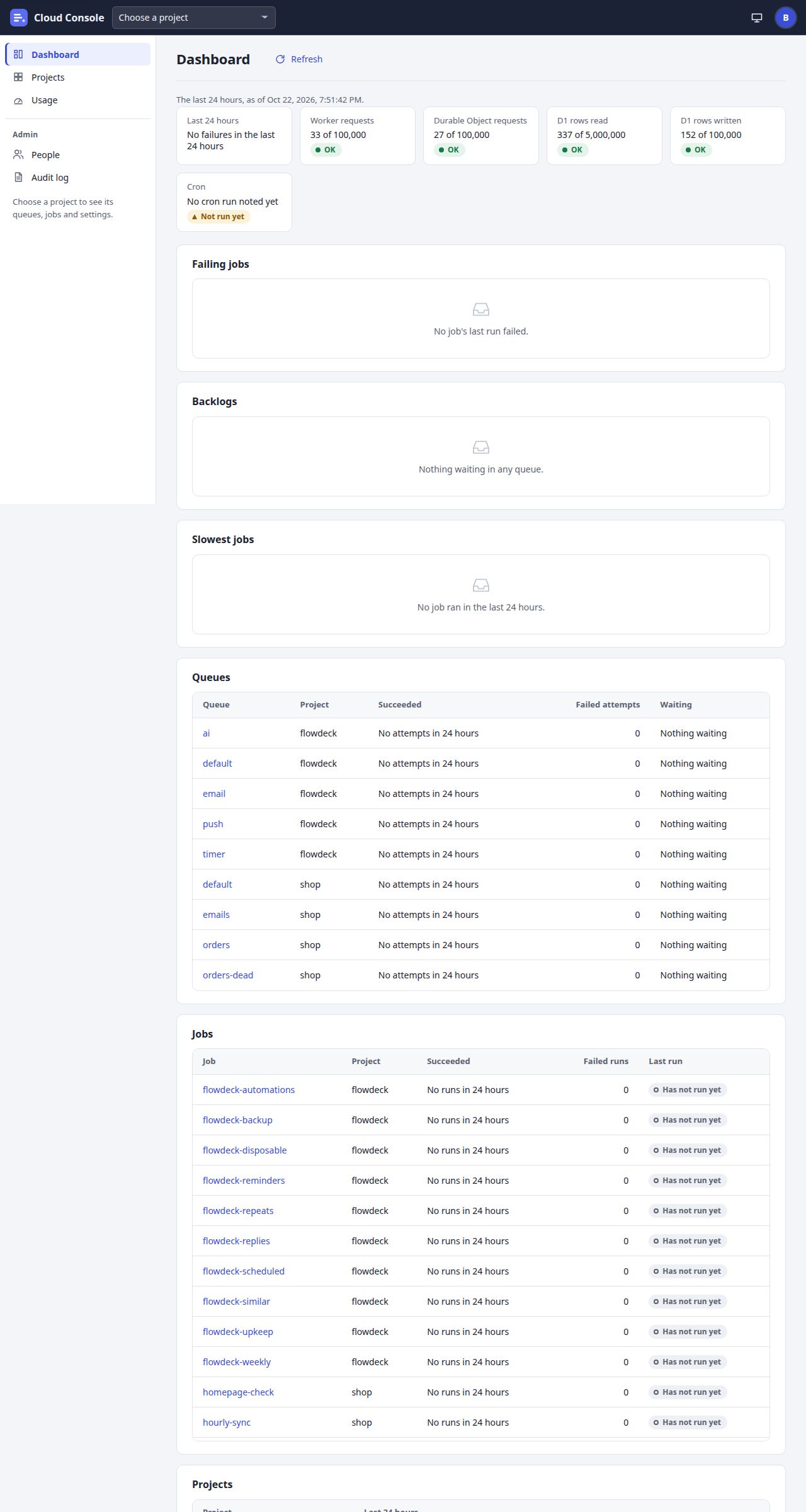
UI breakdown
| Pin | Element | What it does | Rule | Shows or is disabled when | API route |
|---|---|---|---|---|---|
| 1 | Project picker | Lists the projects you may see. Choosing one opens its Queues page. | On the dashboard it reads Choose a project. On a project's own page (Queues, Jobs, API keys, Secrets, Alerts, Export and import) a new choice opens the same page of the other project. | Every signed-in page. | GET /api/projects |
| 2 | Refresh | Asks for the dashboard again and draws it anew. | Disabled and busy while its request runs, so a second click sends nothing. No queue or job object is asked, however many there are. | Once the first answer has come. | GET /api/dashboard |
| 3 | Last 24 hours | The failed job runs and failed task attempts across your projects. | The API's label, such as 3 failed job runs and 12 failed task attempts in the last 24 hours, or No failures in the last 24 hours. | Always. | GET /api/dashboard (failures) |
| 4 | Free-plan tiles | Today's use of each free limit: Worker requests, Durable Object requests, D1 rows read and D1 rows written. | Counted per UTC day. The chip is OK, Near the limit from 80%, or Over the limit at 100%. Over a limit every queue is held and new tasks and job runs are refused until 00:00 UTC, and a red line says until when. | Every signed-in person: they are free-plan totals, not secrets. | GET /api/dashboard (usage) |
| 5 | Cron | When the console's every-minute cron last ran, and which of its parts failed. | Running, Parts failing, Not run yet, or Stale once no run was noted for 10 minutes. A run is noted at most every 5 minutes, so the time may be about 5 minutes behind. | Always; the same for everyone. | GET /api/dashboard (cron) |
| 6 | Failing jobs | The jobs whose last run failed, newest first, each linking to its job. | At most 20. With none: No job's last run failed. | Always; empty state when none. | GET /api/dashboard (failing) |
| 7 | Backlogs | The queues with tasks waiting, the most first. | At most 10. Each says how many wait and how long ago the oldest was due, as its queue last noted it (at most about 15 minutes old while the queue is busy). With none: Nothing waiting in any queue. | Always; empty state when none. | GET /api/dashboard (backlogs) |
| 8 | Slowest jobs | The 5 jobs whose final attempt took longest in the last 24 hours. | With none: No job ran in the last 24 hours. | Always; empty state when none. | GET /api/dashboard (slowest) |
| 9 | Queues | Each queue's share of attempts that succeeded, its failed attempts, and what waits. | The lowest success rate first, then the most attempts, then by name; at most 50. With no attempts the rate reads No attempts in 24 hours, otherwise like 98.5% of 200. | Always. | GET /api/dashboard (queues) |
| 10 | A queue's link | Opens that queue's page. | The project and the queue travel in the address. | Every row. | Goes to /queue?project=shop&queue=orders |
| 11 | Jobs | Each job's success rate over its runs, its failed runs and its last run. | The same order and cap as Queues. Last run is a chip: Success, Failed (503), Skipped (daily quota) or Has not run yet. | Always. | GET /api/dashboard (jobs) |
| 12 | Projects | One line per project with its failures in the last 24 hours, linking to its Queues page. | A person with no project at all sees You have no projects yet. An admin gives you access to one; it shows here. | Always. | GET /api/dashboard (projects) |
User stories and acceptance criteria
Only my projects count
Given a member who may read shop and no other project
When they open the dashboard
Then only shop's failures, queues and jobs are counted and listed; an admin sees every project.
The cron has stopped
Given the cron's last run was noted 25 minutes ago
When the dashboard loads
Then the Cron tile's chip reads Stale and its line reads
Last run noted 25 minutes ago: the cron may have stopped
.Nothing is failing
Given no job's last run failed
When the dashboard loads
Then Failing jobs shows
No job's last run failed.
in place of a table.The load fails
Given the dashboard request fails
When the page opens
Then it shows its heading, the error and Try again in place, never a blank page.
2. Projects
/projects
The projects you may see, a link to each one's pages as your permissions allow, and the maintenance switches that hold dispatch during a deploy.
On a narrow screen the picture scrolls sideways. A pin opens its row in the table.
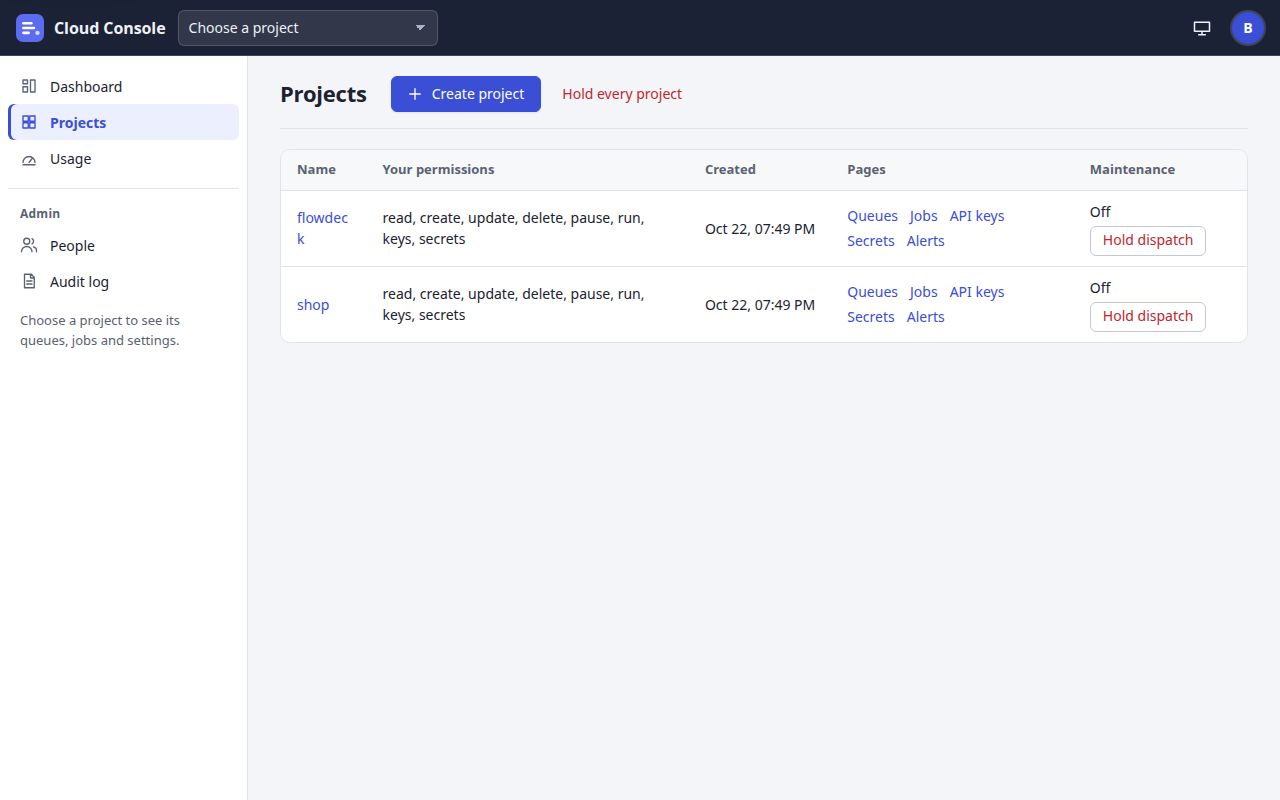
UI breakdown
| Pin | Element | What it does | Rule | Shows or is disabled when | API route |
|---|---|---|---|---|---|
| 1 | Create project | Opens the Create a project panel: a Project name and Create. | The name is lower-case letters, digits and dashes, for example flowdeck. Every project has the queue default from the start. Cancel closes the panel and gives the focus back to this button. | Shown with createProject in /api/me's allowed actions: admins only. | POST /api/projects (admin) |
| 2 | Hold every project | The whole console's maintenance switch. It asks first: Hold dispatch for the whole console? | While it is on, no task is sent and no job runs; new tasks are still accepted and wait, and scheduled runs are skipped and logged. A switch changes at most once every 10 seconds. It reads Resume every project while on. | Admins only, from the console switch's allowedActions (maintenanceOn or maintenanceOff). | PUT /api/maintenance { on } |
| 3 | Project name | Opens the project's Queues page. | Names travel in the query string; there is no single-page fallback. | Every project you may read. | Goes to /queues?project=flowdeck |
| 4 | Your permissions | Your grants in this project, as plain names. | Eight permissions: read, create, update, delete, pause, run, keys and secrets. An admin may do everything. | Always. | GET /api/projects (permissions) |
| 5 | Queues, Jobs, Secrets | Open the project's Queues, Jobs and Secrets pages. | Secrets shows names only; adding or changing one needs the secrets permission. | For anyone who may read the project. | Go to /queues, /jobs, /secrets with ?project= |
| 6 | API keys, Alerts | Open the project's API keys and Alerts pages. | Each link is a permission of the same name's page: API keys needs keys, Alerts needs update. | API keys with the keys permission; Alerts with update. | Go to /keys, /alerts with ?project= |
| 7 | Hold dispatch | This project's maintenance switch. It asks first, Hold dispatch for flowdeck?, then loads the page again so every banner says the new state. | No task is sent and no job runs until it is resumed; new tasks are still accepted and wait. At most one change in 10 seconds. An app may switch it with its API key, but a hold a person turned on only a person turns off. | From the project's maintenance allowedActions: the pause permission. Reads Resume dispatch while on. | PUT /api/projects/{p}/maintenance { on } |
| 8 | Account menu | Your account, Sign out, and Sign out on every device; and the console's version. | Sign out on every device ends every session; your passkeys stay. Neither sign-out counts against the 120 changes an hour. | Every signed-in page. | POST /auth/sign-out, POST /auth/sign-out-all |
User stories and acceptance criteria
A member cannot make projects
Given a member, not an admin
When they open Projects
Then Create project and Hold every project are not shown, and
POST /api/projectsanswers 403 for them.Hold a project for a deploy
Given I have the pause permission in flowdeck
When I click Hold dispatch and confirm
Then every page shows
Maintenance is on for flowdeck: its queues and jobs are held
, and tasks an app adds meanwhile are accepted and wait.Two switches too close together
Given flowdeck's switch changed 5 seconds ago
When I switch it again
Then the API answers 429:
A maintenance switch changes at most once every 10 seconds; try again shortly
.Links follow permissions
Given a member without the keys permission in shop
When they open Projects
Then shop's row has no API keys link.
3. Queues
/queues?project=shop
The project's queues with Cloud Tasks' columns, 25 a page. A row's menu holds only the actions its allowedActions list.
On a narrow screen the picture scrolls sideways. A pin opens its row in the table.
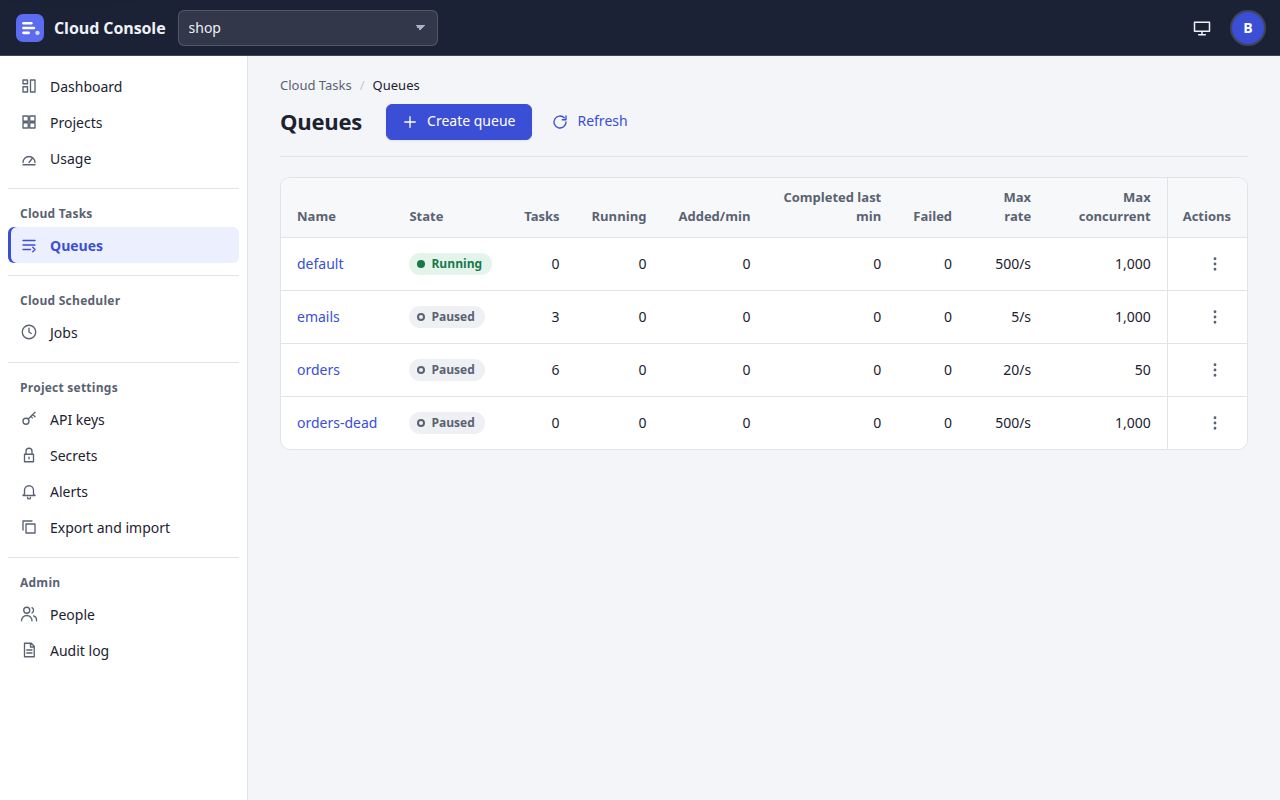
UI breakdown
| Pin | Element | What it does | Rule | Shows or is disabled when | API route |
|---|---|---|---|---|---|
| 1 | Create queue | Opens Create queue. | A project has at most 100 queues; one more is 409 A project has at most 100 queues. | When the list answers createQueue: the create permission. | Goes to /queue-edit?project=shop |
| 2 | Refresh | Asks for the same page of queues again. | Each queue's counts cost a request to its object, so a page is charged 10 rows per queue to your read budget. While a page is asked, Refresh and the page buttons are disabled. | Always. | GET /api/projects/{p}/queues?pageToken= |
| 3 | Queue name | Opens the queue's page, on its Tasks tab. | A name is 1 to 63 lower-case letters, digits and dashes, starting with a letter, and cannot change. | Every row. | Goes to /queue?project=shop&queue=default |
| 4 | State | The queue's state, as the API labels it. | Running, Paused, or Held until 00:00 UTC (daily limit)for a low-priority queue held near a free limit. A paused queue still takes tasks; they wait. | Always. | stateLabel |
| 5 | Tasks and counts | Tasks waiting, running, added and completed in the last minute, and failed. | Counted by the queue's own object at the time of the answer. | Always. | stats |
| 6 | Max rate, Max concurrent | The queue's rate limits: dispatches a second, and calls at once. | More than 0 and at most 500 a second; 1 to 5,000 at once. Set on Create or Edit queue. | Always. | maxDispatchesPerSecond, maxConcurrentDispatches |
| 7 | Menu of default | Edit, Pause and Purge. There is no Delete. | The default queue cannot be deleted; the API refuses it too: 409 The default queue cannot be deleted. | Edit with update; Pause or Resume with pause, by state; Purge and Delete with delete. | POST …/queues/{q}/pause, /resume, /purge |
| 8 | Menu of orders | Edit, Resume, Purge and Delete. Purge and Delete ask first. | Purge deletes every queued task; running ones finish. Delete removes the queue and its tasks, and is 409 while a job adds tasks to it or another queue forwards its failed tasks to it. | From the row's allowedActions. | POST …/purge, DELETE /api/projects/{p}/queues/{q} |
| 9 | orders-dead | A queue that orders forwards its failed tasks to. | While another queue names it, deleting it is 409 Queue orders forwards its failed tasks to this queue; change that first. | Every row. | Goes to /queue?project=shop&queue=orders-dead |
User stories and acceptance criteria
The default queue stays
Given the default queue's row
When I open its menu
Then it offers Edit, Pause and Purge but no Delete, and a delete sent anyway is 409
The default queue cannot be deleted
.Purge a queue
Given orders holds 6 queued tasks
When I choose Purge and confirm
Purge orders?
Then every queued task is deleted, running ones finish, and the notice reads
Purged 6 tasks from orders.
More than one page
Given a project with 30 queues
When the list loads
Then 25 show with Next page; Next page asks with the answer's
nextPageToken, and Previous page goes back to the token before.Read only
Given a member with only the read permission
When they open Queues
Then Create queue is not shown and no row has a menu: the rows list no actions.
4. Queue, Tasks tab
/queue?project=shop&queue=orders
A queue as Cloud Tasks shows it: the toolbar in Google's order, the summary strip, and five tabs. Each button is one the queue's allowedActions list.
On a narrow screen the picture scrolls sideways. A pin opens its row in the table.
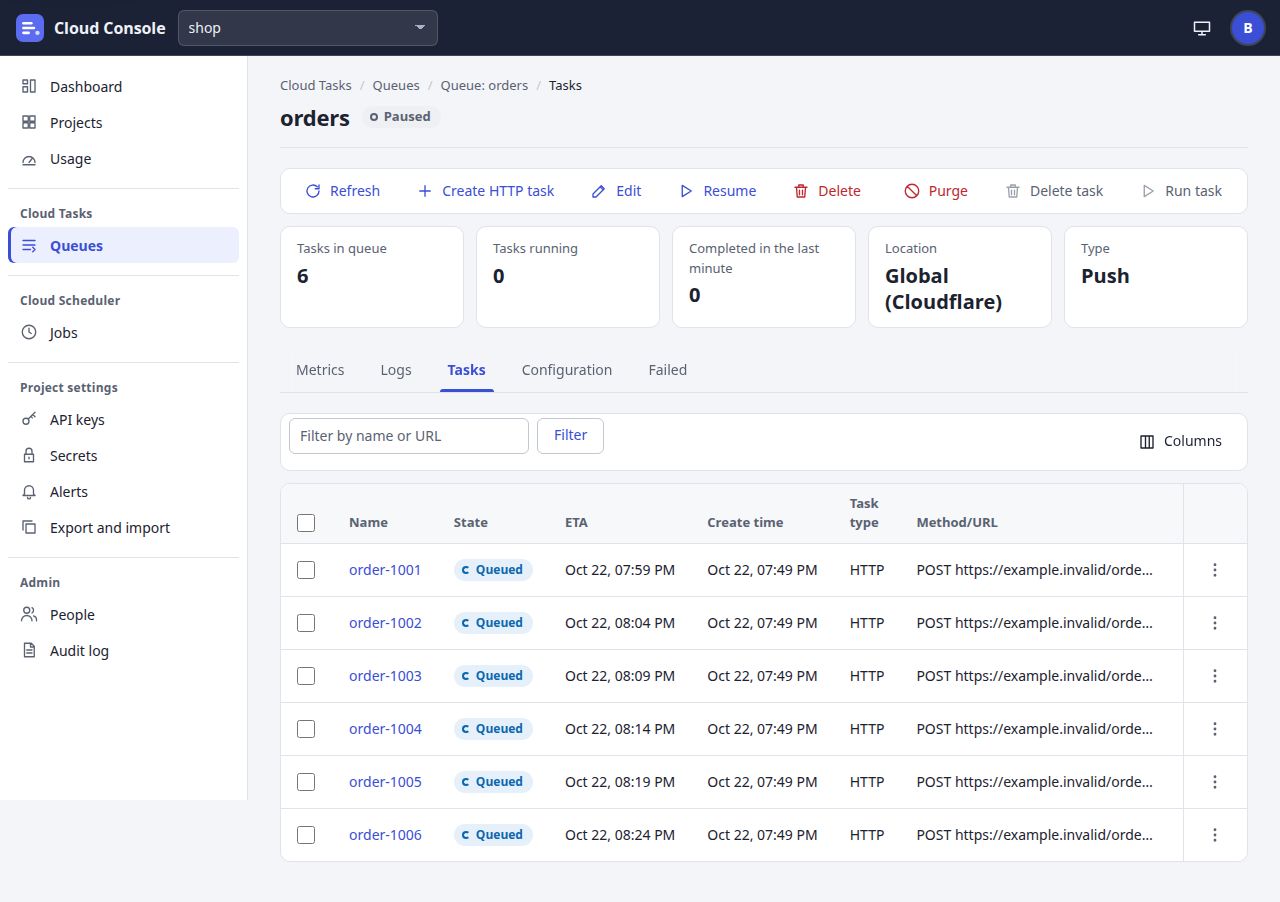
UI breakdown
| Pin | Element | What it does | Rule | Shows or is disabled when | API route |
|---|---|---|---|---|---|
| 1 | Create HTTP task | Opens Create a task for this queue. | A paused or held queue takes new tasks; they wait. | createTask: the create permission. | Goes to /task-new?project=shop&queue=orders |
| 2 | Edit | Opens Edit orders: every setting but the name. | The name cannot change. | edit: the update permission. | Goes to /queue-edit?project=shop&queue=orders |
| 3 | Resume | Starts sending the queue's due tasks again. It reads Pause while the queue runs. | Pausing a paused queue is fine. Tasks still join a paused queue and wait. | pause or resume, by state: the pause permission. | POST /api/projects/{p}/queues/{q}/resume (or /pause) |
| 4 | Delete | Deletes the queue and its tasks after Delete orders?, then goes back to Queues. | Never for default. 409 while a job adds tasks to it or another queue forwards to it. It cannot be undone. | delete: the delete permission. | DELETE /api/projects/{p}/queues/{q} |
| 5 | Purge | Deletes every queued task after Purge orders?. | Running tasks finish. The notice says how many, such as Purged 6 tasks from orders. | purge: the delete permission. | POST /api/projects/{p}/queues/{q}/purge |
| 6 | Delete task | Deletes the ticked tasks in one request, after a confirm that names them. | 1 to 50 different names. A queued or failed task is deleted; one running or done is refused (The task is running or already done) and the rest go on. | Disabled until a row is ticked on the Tasks tab. Shown with deleteTasks: the delete permission. | POST …/queues/{q}/tasks/batch-delete { tasks } |
| 7 | Run task | Runs the ticked tasks now, in one request. | A queued task becomes due now; a failed one is retried with its name and logs, attempts from 0. The notice is the API's label, such as Ran 2 tasks, with ; 1 could not bewhen some were refused. | Disabled until a row is ticked. Shown with runTasks: the run permission. | POST …/queues/{q}/tasks/batch-run { tasks } |
| 8 | Tasks tab | The queue's tasks, 50 at a time, with Load more. | The tab a plain address opens; the chosen tab stays in the address (?tab=). Queued tasks come in due order, then the rest newest first. A plain list is at most 120 an hour per person per queue, 240 per queue. | Always. | GET …/queues/{q}/tasks?pageSize=50 |
| 9 | Filter | Shows only the tasks whose name or URL holds the text, ignoring case. | 1 to 100 characters. The API filters the queue's newest 500 tasks and says so when it holds more. At most 10 filtered or sorted lists an hour per person, and 60 per queue. | Always. | GET …/tasks?filter= |
| 10 | Columns | Hides or shows State, ETA, Create time, Task type, Method/URL, Retries, Executions and Last response. | Display only: no request. Name always shows. | Always. | None |
| 11 | Select every task shown | Ticks every row shown, or clears them all. | Ticking any row enables Delete task and Run task. A ticked row that leaves the list on a reload is unticked. | Always. | None |
| 12 | Sort by ETA | Sorts the list through the API; a second click reverses it. | Name, ETA, Create time, Method/URL, Retries and Executions sort. ETA puts done tasks last. A sorted list counts as a filtered one. | Always. | GET …/tasks?sort=eta (or -eta) |
| 13 | Task name | Opens the task and its attempts. | The name is cut to its column and whole on hover. | Every row. | Goes to /task?project=shop&queue=orders&task=order-1001 |
| 14 | Row menu | Run now, Retry or Delete for this one task. | Run now while queued and Retry when failed (run); Delete while queued or failed (delete), after Delete order-1001?. | From the task's allowedActions. | POST …/tasks/{t}/run, DELETE …/tasks/{t} |
User stories and acceptance criteria
Run two ticked tasks
Given no row is ticked, so Delete task and Run task are disabled
When I tick order-1001 and order-1002 and click Run task
Then one request sends both names to
batch-runand the notice readsRan 2 tasks.
One task in a batch is refused
Given two ticked tasks, one of them running
When I click Delete task and confirm
Then the other is deleted and the red notice reads
Deleted 1 task; 1 could not be.
with that task's name andThe task is running or already done
.Too many filtered lists
Given I filtered or sorted this queue's tasks 10 times this hour
When I click Filter again
Then the API answers 429
At most 10 filtered or sorted task lists an hour; try again later
and the list stays as it was.No run permission
Given a member without the run permission
When they open the queue
Then Run task is not in the toolbar and no row menu offers Run now or Retry.
5. Queue, Configuration tab
/queue?project=shop&queue=orders&tab=configuration
The same queue on its Configuration tab: the settings grouped as Google groups them, worded by the API. The other tabs are pinned here too.
On a narrow screen the picture scrolls sideways. A pin opens its row in the table.
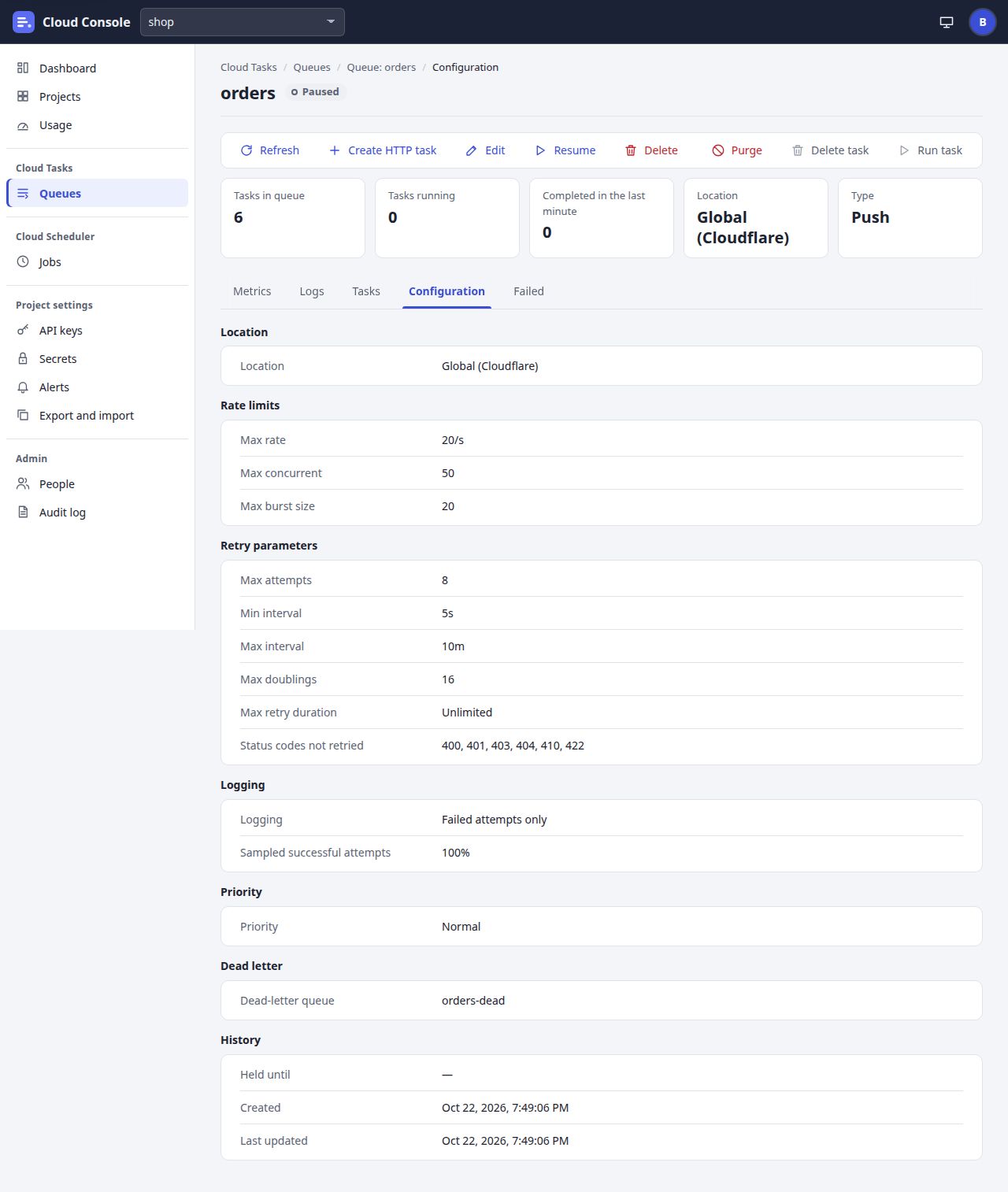
UI breakdown
| Pin | Element | What it does | Rule | Shows or is disabled when | API route |
|---|---|---|---|---|---|
| 1 | State chip | The queue's state beside its name. | Running, Paused or Held until; the colour follows the state. | Always. | GET /api/projects/{p}/queues/{q} (stateLabel) |
| 2 | Summary strip | Tasks in queue, Tasks running, Completed in the last minute, Location and Type. | Location is Global (Cloudflare)and Type Pushfor every queue. | Always. | stats, location, type |
| 3 | Metrics tab | Charts of the tasks completed and leased, the queue depth, the attempts and the tasks added. | Ranges 1 hour (the default), 6 and 12 hours, 1, 2, 4, 7, 14 and 30 days. Create alerting policy opens Alerts. | Always. | GET …/queues/{q}/metrics?range= |
| 4 | Logs tab | Every attempt logged: time, task, code, duration, error. | While logging is failures only, a banner says so, with Turn on success sampling. Failed attempts are kept 7 days. | Turn on success sampling shows with edit: the update permission. | GET …/queues/{q}/logs; PATCH …/queues/{q} { logging: "sample" } |
| 5 | Configuration tab | The settings, read only. | Every label and value is the API's; the times are formatted by the page. | Always. | configuration |
| 6 | Failed tab | The tasks that failed for good, with Retry all and Delete all. | Failed tasks are kept 7 days. Delete all asks first: Delete every failed task? | Retry all with retryFailed (run); Delete all with deleteFailed (delete). | GET …/tasks?state=failed, POST …/failed/retry, DELETE …/failed |
| 7 | Location | Where the queue runs. | Always Global (Cloudflare). | Always. | configuration |
| 8 | Rate limits | Max rate, Max concurrent and Max burst size. | Max burst size is worked out, never set: the larger of 1 and the rate rounded down, so 20/s gives 20. | Always. | maxBurstSize |
| 9 | Retry parameters | Max attempts, Min interval, Max interval, Max doublings, Max retry duration, Status codes not retried. | Max attempts -1 reads Unlimited; Max retry duration 0s reads Unlimited; no codes reads None. | Always. | configuration |
| 10 | Logging | What is kept of the attempts. | Failed attempts only, or a share of the successful ones too. Failed attempts are always kept. | Always. | logging, logSamplePercent |
| 11 | Priority | Normal or Low. | Low queues are held first near a free limit, until the next UTC day. | Always. | priority |
| 12 | Dead letter | The queue that tasks failing for good are copied to, or None. | A copy is made once and counts against the daily quota; the original stays on the Failed tab. | Always. | deadLetterQueue |
| 13 | History | Held until, Created and Last updated. | Held until reads a dash unless the queue is held. | Always. | heldUntil, createdAt, updatedAt |
User stories and acceptance criteria
Burst follows the rate
Given orders sends at most 20 a second
When I open its Configuration tab
Then Rate limits shows Max rate 20/s, Max concurrent 50 and Max burst size 20.
Turn on success sampling
Given the queue logs failed attempts only and I have the update permission
When I open Logs and click Turn on success sampling
Then the page sends
{ logging: "sample" }and saysSuccess sampling is on for orders.
Retry every failed task
Given the Failed tab lists three failed tasks and I have the run permission
When I click Retry all
Then they are sent again and the notice reads
Retried failed tasks: 3.
6. Task
/task?project=shop&queue=orders&task=order-1001
One task and its attempts (the inspector). Headers and body show while the task waits or runs; the API drops them once it is done.
On a narrow screen the picture scrolls sideways. A pin opens its row in the table.
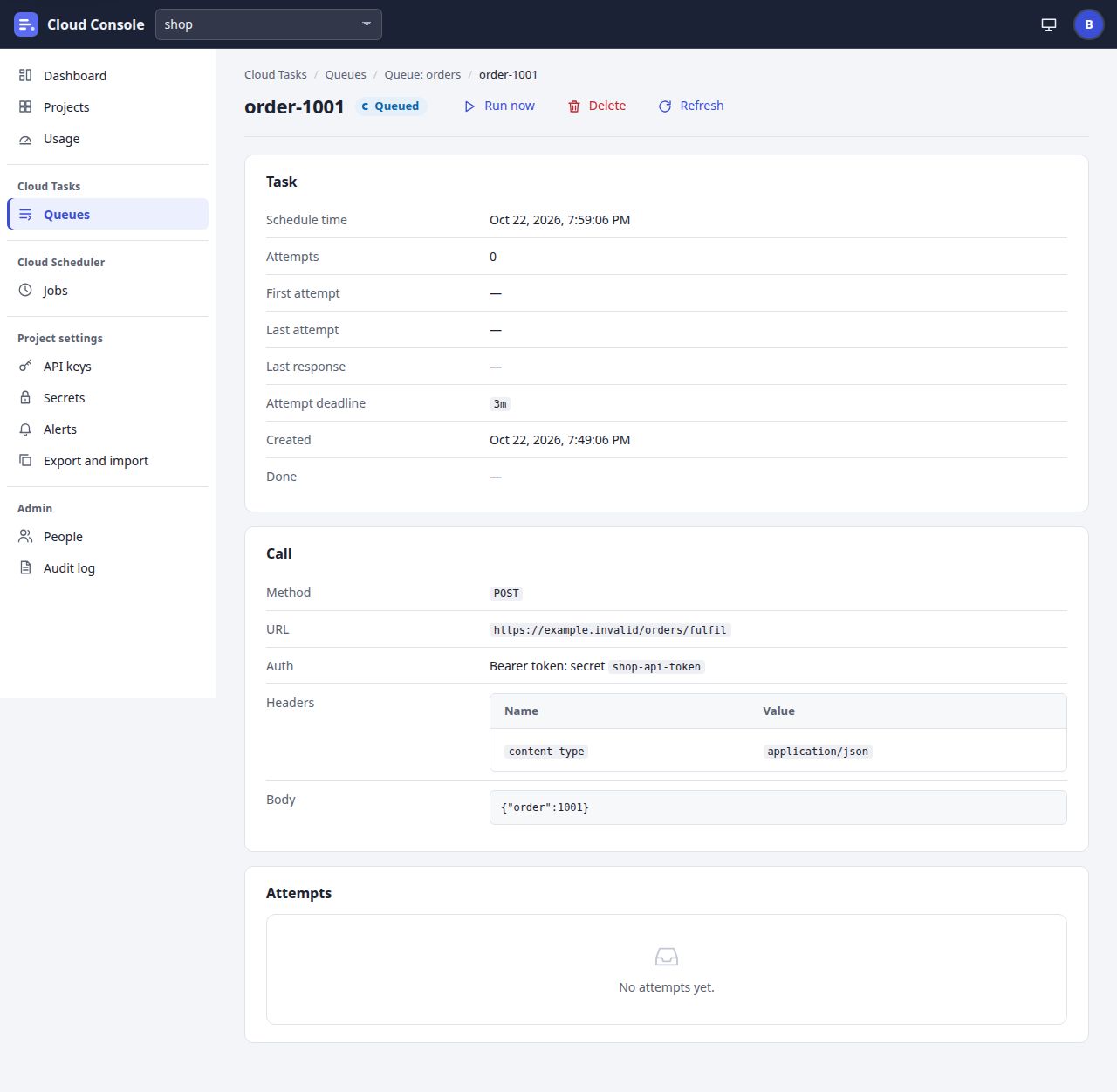
UI breakdown
| Pin | Element | What it does | Rule | Shows or is disabled when | API route |
|---|---|---|---|---|---|
| 1 | State chip | The task's state. | Queued, Retrying (attempt 3), Running, Succeeded, Failed or Deleted. | Always. | GET …/queues/{q}/tasks/{t} (stateLabel) |
| 2 | Run now | Makes a queued task due now. On a failed task it reads Retry and retries it. | A retry keeps the name and logs, attempts from 0. 409 while running or done. The notice: order-1001 runs now. | run while queued, retry when failed: the run permission. | POST /api/projects/{p}/queues/{q}/tasks/{t}/run |
| 3 | Delete | Deletes the task after Delete order-1001?. | Only while queued or failed; 409 The task is runningor when it is already done. | delete: the delete permission. | DELETE /api/projects/{p}/queues/{q}/tasks/{t} |
| 4 | Refresh | Reads the task again. | Disabled and busy while it runs. | Always. | GET …/tasks/{t} |
| 5 | Task | Schedule time, attempts, first and last attempt, last response, attempt deadline, created and done. | A dead-letter copy also shows Forwarded from, linking to the original. | Always. | GET …/tasks/{t} |
| 6 | Last response | The last attempt's error, or its status code. | An answer that is never retried ends with why, such as 404 Not Found; stopped: 404 is not retried. | A dash before the first attempt. | lastError, lastStatusCode |
| 7 | Call | Method, URL, auth, headers and body. | Headers and body are sealed while the task waits, and dropped once it is done: Dropped once the task was done. | Always. | GET …/tasks/{t} |
| 8 | Auth | The auth option and the name it uses. | A secret's name or a service account's email, never a value. | Always. | auth |
| 9 | Body | The body as text. | At most 100 KB; sent as it is. | While the task waits or runs. | body |
| 10 | Attempts | Each attempt: its time, duration, status or error kind, and the first 1 KB of the answer. | Newest first, 50 a page. Failed attempts are always kept; the newest 10 per task. Empty: No attempts yet. | Always. | GET …/tasks/{t}/attempts |
User stories and acceptance criteria
Run a queued task now
Given a queued task due later, and the run permission
When I click Run now
Then it becomes due now and the notice reads
order-1001 runs now.
Retry a failed task
Given a task that failed for good
When I open it
Then the first button reads Retry, and clicking it retries the task under the same name, attempts from 0.
A finished task
Given a task that succeeded
When I open it
Then Headers and Body read
Dropped once the task was done
and no Run now or Delete is offered.
7. Create queue
/queue-edit?project=shop
Create queue, or Edit queue with every setting. The form starts from the API's defaults and sends what was typed; each refused field shows its message beside it.
On a narrow screen the picture scrolls sideways. A pin opens its row in the table.
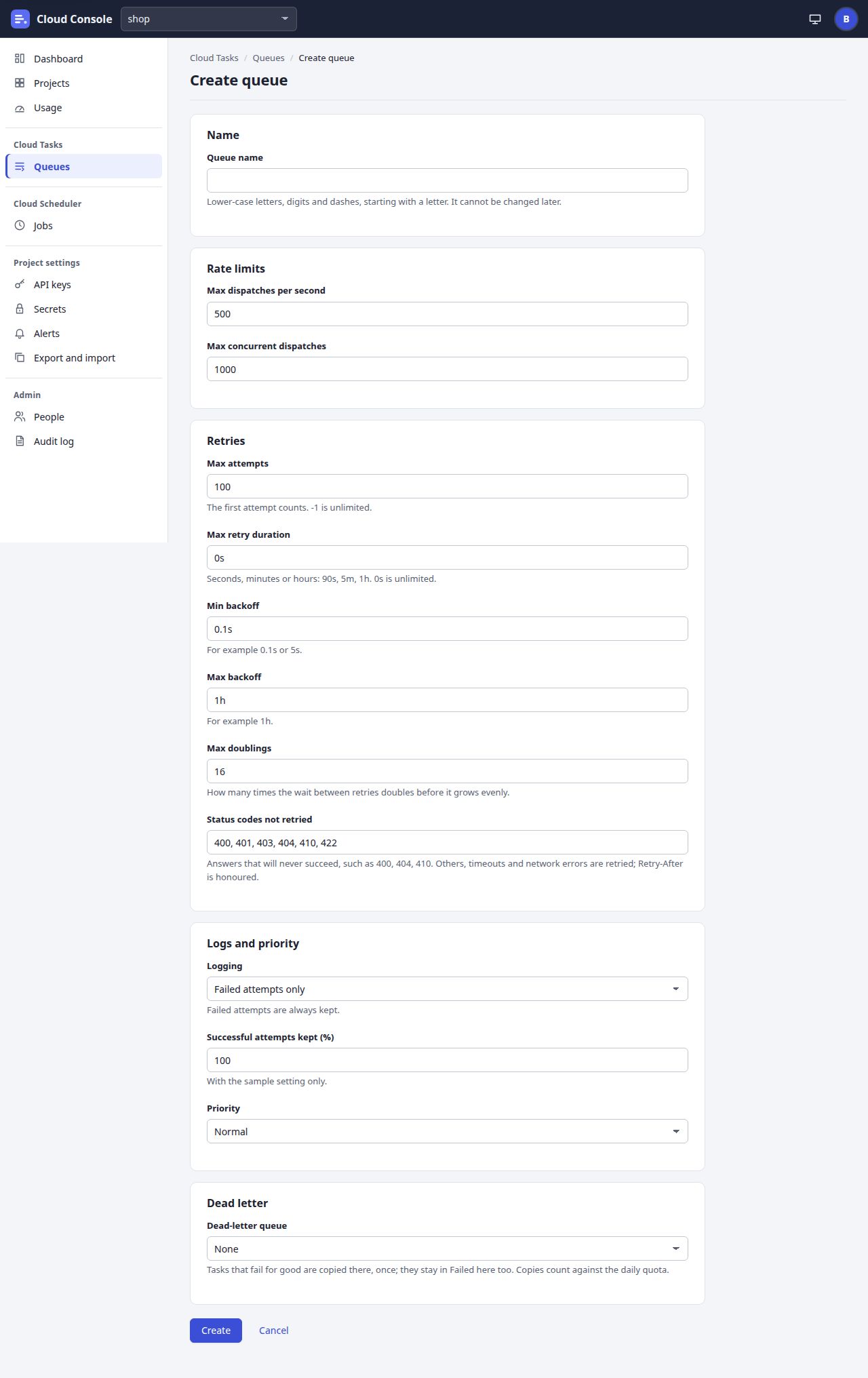
UI breakdown
| Pin | Element | What it does | Rule | Shows or is disabled when | API route |
|---|---|---|---|---|---|
| 1 | Queue name | The new queue's name. | 1 to 63 lower-case letters, digits and dashes, starting with a letter; unique in the project; it cannot change. Taken: 409 A queue named orders exists in this project. | On Create only; Edit has no name field. | name |
| 2 | Max dispatches per second | How many tasks a second the queue sends. | More than 0, at most 500. Default 500. | Always. | maxDispatchesPerSecond |
| 3 | Max concurrent dispatches | How many calls may run at once. | A whole number, 1 to 5,000. Default 1,000. | Always. | maxConcurrentDispatches |
| 4 | Max attempts | How many attempts a task gets. | The first attempt counts. -1 is unlimited, else 1 to 1,000. Default 100. | Always. | maxAttempts |
| 5 | Max retry duration | How long after its first attempt a task may still be retried. | Whole seconds up to 30 days, typed as 90s, 5m or 1h. 0s is unlimited, the default. | Always. | maxRetryDuration |
| 6 | Min backoff | The first wait between retries. | 0.1s to 24h, and at most Max backoff: minBackoff is at most maxBackoff. Default 0.1s. | Always. | minBackoff |
| 7 | Max backoff | The longest wait between retries. | 0.1s to 24h. Default 1h. | Always. | maxBackoff |
| 8 | Max doublings | How many times the wait doubles before it grows evenly. | 0 to 16. Default 16. | Always. | maxDoublings |
| 9 | Status codes not retried | Answers that will never succeed: the task fails at once. | 0 to 50 different codes from 300 to 599, typed as 400, 404. Default 400, 401, 403, 404, 410, 422. Others, timeouts and network errors are retried; Retry-After is honoured. | Always. | noRetryStatuses |
| 10 | Logging | Failed attempts only, or a sample of the successful ones too. | Failed attempts are always kept. Default failed attempts only. | Always. | logging |
| 11 | Successful attempts kept (%) | The share of successful attempts logged. | 1 to 100. Default 100. Used with the sample setting only. | Always. | logSamplePercent |
| 12 | Priority | Normal, or Low (held first near a free limit). | A low queue is held until the next UTC day when a free limit is near. Default Normal. | Always. | priority |
| 13 | Dead-letter queue | Another queue of the project where tasks that fail for good are copied, or None. | Refused: the queue itself (A queue cannot forward its failed tasks to itself), a queue that is not in the project, or a loop ( Forwarding to b would loop back: b → c → a). | Always; the list is every queue of the project. | deadLetterQueue; the list from GET …/queues?view=names |
| 14 | Create | Makes the queue and opens its page, which says Created the queue …once. On Edit it reads Save. | Nothing is checked on the page: the API checks every field and answers a message per field. | Create with the create permission; Save with update. | POST /api/projects/{p}/queues or PATCH …/queues/{q} |
User stories and acceptance criteria
Backoff the wrong way round
Given Min backoff 2h and Max backoff 1h
When I click Create
Then nothing is made and Min backoff shows
minBackoff is at most maxBackoff
.A forwarding loop
Given queue b forwards to c, and c to a
When I set a's dead-letter queue to b and save
Then it is refused beside Dead-letter queue:
Forwarding to b would loop back: b → c → a
.The form starts from the defaults
Given a new queue
When the form opens
Then it shows 500, 1000, 100, 0s, 0.1s, 1h, 16, the six status codes, Failed attempts only, 100, Normal and None, as
GET /api/defaults/queuesanswers them.
8. Create a task, and From a file
/task-new?project=shop&queue=orders
Create HTTP task: an optional name and schedule time, the call and the attempt deadline. Under it, From a file makes up to 50 tasks in one request.
On a narrow screen the picture scrolls sideways. A pin opens its row in the table.
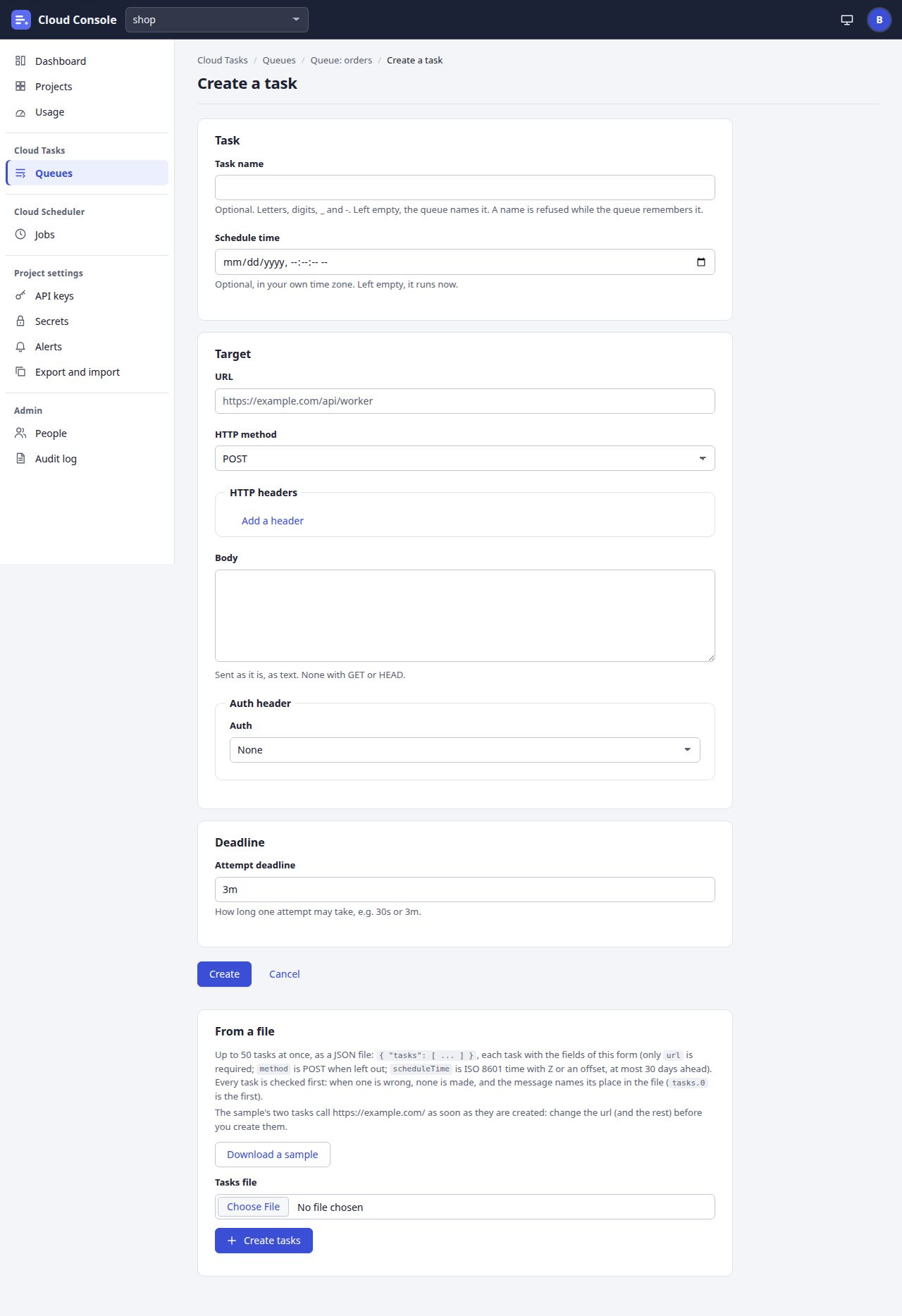
UI breakdown
| Pin | Element | What it does | Rule | Shows or is disabled when | API route |
|---|---|---|---|---|---|
| 1 | Task name | The task's name, or empty. | 1 to 500 letters, digits, _ and -. Left empty, the queue names it. Refused with 409 while the queue remembers it: A task named x is in this queue, or succeeded or was deleted within the last day. | Always; optional. | name |
| 2 | Schedule time | When the task is due, in your own time zone. | Sent as ISO 8601 with Z. Empty or past is now; at most 30 days ahead: scheduleTime is at most 30 days ahead. | Always; optional. | scheduleTime |
| 3 | URL | Where the call goes. | http:// or https://, at most 2,048 characters; private and local addresses are refused. With a credential, it must be at one of that secret's allowed origins. | Always; required. | url |
| 4 | HTTP method | POST, GET, HEAD, PUT, DELETE, PATCH or OPTIONS. | Default POST. | Always. | method |
| 5 | Add a header | Adds a name and value row, with Remove. | At most 50. A name is letters, digits, - and _; Authorization, Host and the other protected headers cannot be set. | Always. | headers |
| 6 | Body | The body, sent as it is, as text. | At most 100 KB. None with GET or HEAD: A GET or HEAD request has no body. | Always; optional. | body |
| 7 | Auth | None, HMAC signature, Basic auth, Bearer token, OIDC token or OAuth token. | A secret is picked by name from the project's secrets of that kind; OIDC takes a service account and an audience. Basic, Bearer and OAuth go to https:// only. | Always; the secret and OIDC fields show for their option. | auth; the lists from GET …/secrets, GET …/service-accounts |
| 8 | Attempt deadline | How long one attempt may take. | 15s to 15m. Default 3m. | Always. | attemptDeadline |
| 9 | Create | Makes the task and opens its page, which says Created the task …once. | Counts against the project's daily quota: over it, 429 with code quota and nothing is added. | The create permission. | POST /api/projects/{p}/queues/{q}/tasks |
| 10 | From a file | Up to 50 tasks at once, from a JSON file { "tasks": [ … ] }. | Each task has this form's fields; only url is required. Shown with the form once it has loaded. | Always. | None |
| 11 | Download a sample | Saves cloud-console-tasks-sample.json. | The page's own text, no request. Its two tasks call https://example.com/ as soon as they are made, so change them first. | Always. | None |
| 12 | Create tasks | Posts the file chosen in Tasks file, as it is, in one request. | A file that is not JSON is said so without a request. The file is checked whole: one mistake and nothing is made. The quota is counted for the whole file. Each 10 tasks count as one of your 120 changes an hour. Once tasks were made the file is let go. | The create permission. | POST …/queues/{q}/tasks/batch-create { tasks } |
User stories and acceptance criteria
A mistake in the second task
Given a file whose second task has no url
When I click Create tasks
Then nothing is made and the message lists
tasks.1.urlwithurl is required: an http:// or https:// URL
.A name the queue remembers
Given a file of 3 tasks, one named like a task that succeeded an hour ago
When I click Create tasks
Then the other two are made, the status line reads
Created 2 tasks; 1 could not be
, and the refused task is listed with why.Not a JSON file
Given I chose a text file that is not JSON
When I click Create tasks
Then no request is sent and the page says
notes.txt is not a JSON file.
Too far ahead
Given a schedule time 40 days from now
When I click Create
Then nothing is made and Schedule time shows
scheduleTime is at most 30 days ahead
.
9. Jobs
/jobs?project=shop
The Jobs list as Cloud Scheduler's. The filter, the columns and the sort are display only, over the rows the API gave. The toolbar acts on the ticked jobs, calling each job's own route once per job.
On a narrow screen the picture scrolls sideways. A pin opens its row in the table.
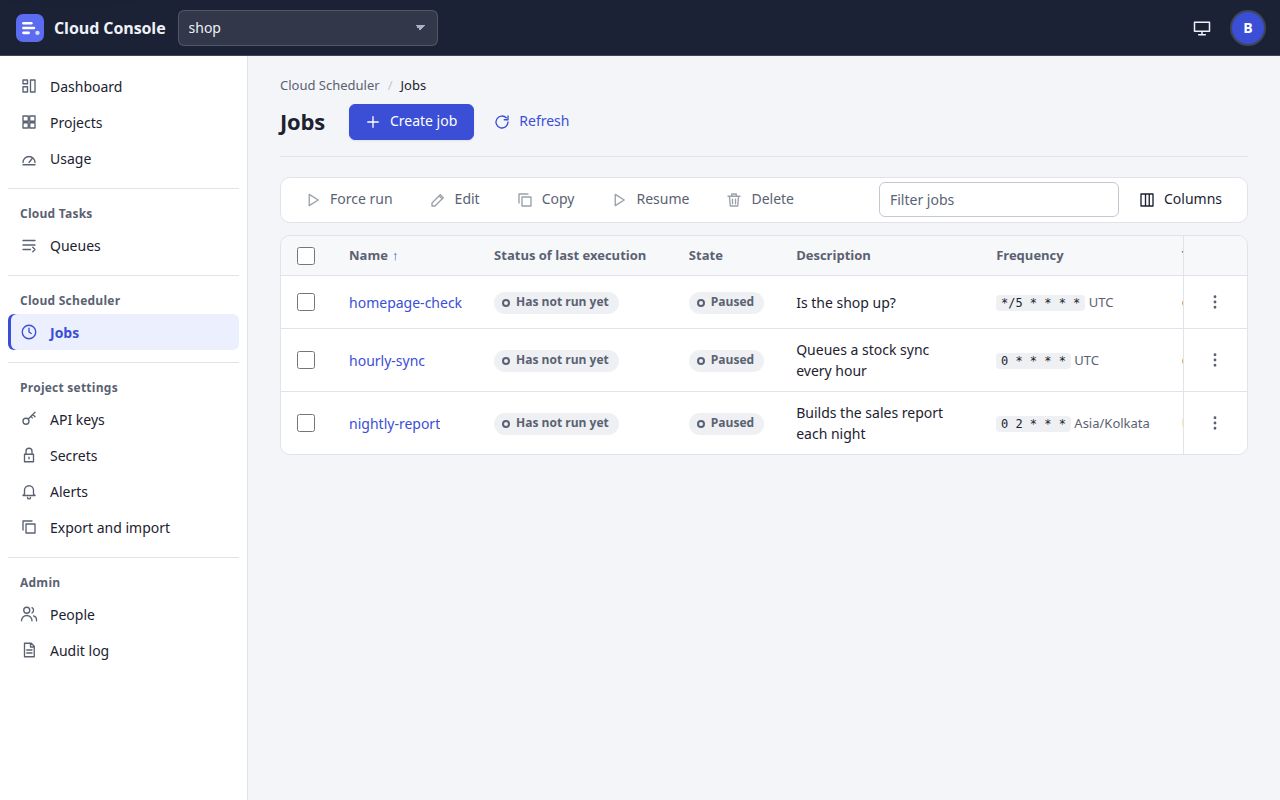
UI breakdown
| Pin | Element | What it does | Rule | Shows or is disabled when | API route |
|---|---|---|---|---|---|
| 1 | Create job | Opens Create a job. | A project has at most 200 jobs. | When the list answers createJob: the create permission. | Goes to /job-edit?project=shop |
| 2 | Refresh | Reads the jobs again. | The jobs come whole, not a page at a time. | Always. | GET /api/projects/{p}/jobs |
| 3 | Force run | Runs each ticked job now, besides its schedule. | Each run counts against the daily quota; over it, 429. The notice says how many were done and the first refusals. | Shown when some job allows forceRun (run); works when every ticked job does. | POST …/jobs/{j}/run, once per job |
| 4 | Edit | Opens Edit for the ticked job. | One job only. | Enabled with exactly one ticked job that allows edit (update). | Goes to /job-edit?project=shop&job=… |
| 5 | Copy | Opens the create form with the ticked job's settings and an empty name. | There is no copy route: the form posts a new job. | Enabled with exactly one ticked job that allows copy (create). | Goes to /job-edit?project=shop©=… |
| 6 | Resume | Resumes each ticked job. Pause shows when some job is enabled. | All three jobs here are paused, so only Resume shows. | pause or resume, by state: the pause permission. | POST …/jobs/{j}/resume (or /pause) |
| 7 | Delete | Deletes the ticked jobs after a confirm that names them. | The jobs and their run history are deleted. It cannot be undone. | delete: the delete permission. | DELETE /api/projects/{p}/jobs/{j}, once per job |
| 8 | Filter jobs | Narrows the rows as you type. | Matches the name, description, schedule, time zone, target, state and last run. No request. | Always. | None |
| 9 | Columns | Hides or shows every column but Name. | Display only. | Always. | None |
| 10 | Select every job shown | Ticks every job the filter shows. | The toolbar stays disabled until a job is ticked. | Always. | None |
| 11 | Sort by Status of last execution | Sorts the rows; a second click reverses. | Every column sorts, over the rows already answered. | Always. | None |
| 12 | Job name | Opens the job's page on its Logs tab. | A name is 1 to 100 letters, digits, _ and -. | Every row. | Goes to /job?project=shop&job=homepage-check |
| 13 | Row menu | Force run, Pause or Resume, Copy, Edit and Delete for this job. | Delete asks first. | From the job's allowedActions. | The job's own routes |
User stories and acceptance criteria
Resume two jobs at once
Given homepage-check and hourly-sync are paused
When I tick both and click Resume
Then each job's resume route is called in turn and the notice reads
Resume: done for homepage-check, hourly-sync.
Edit takes one job
Given two jobs are ticked
When I look at the toolbar
Then Edit and Copy are disabled; Force run, Resume and Delete stay enabled.
A partial failure
Given two ticked jobs, and room in the day's quota for one run
When I click Force run
Then the red notice reads
Force run: 1 of 2 done.
followed by the refused job and the API's message.
10. Create a job
/job-edit?project=shop
Create, Edit or Copy a job in Cloud Scheduler's three steps. Everything is sent at the end as one job definition; a refused field opens its step and shows its message.
On a narrow screen the picture scrolls sideways. A pin opens its row in the table.
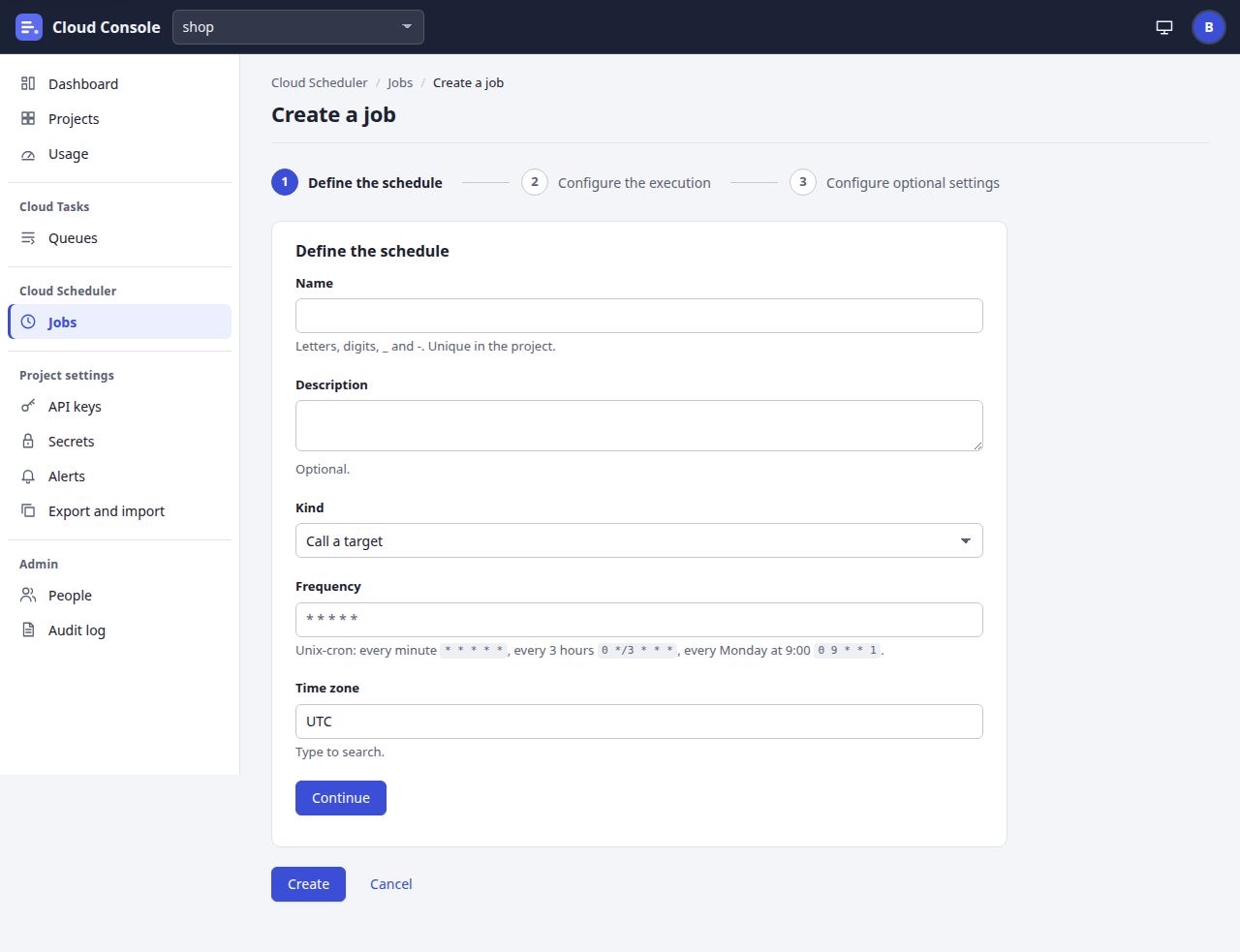
UI breakdown
| Pin | Element | What it does | Rule | Shows or is disabled when | API route |
|---|---|---|---|---|---|
| 1 | Define the schedule | Step 1: name, description, kind, frequency and time zone. | A step heading opens its step; nothing is sent until Create. | Always. | None |
| 2 | Configure the execution | Step 2: the target type, HTTP or Queue (add a task), and the call. | A queue target adds a task named <job>-<scheduled time> to a queue of the project, whose settings then retry it. | Always. | Queues from GET …/queues?view=names |
| 3 | Configure optional settings | Step 3: retry config, attempt deadline, and what a scheduled time does while a run is going or in quiet hours. | Max retry attempts 0 to 5 (default 0); backoff 1s to 24h (5s and 1h); max doublings 0 to 16 (5); deadline 15s to 15m (3m). While a run is still going: skip (the default), queue one run, or allow up to 5 at once. | Always. | None |
| 4 | Name | The job's name. | 1 to 100 letters, digits, _ and -; unique in the project; cannot change, so it is disabled on Edit and empty on Copy. | Always. | name |
| 5 | Description | What the job is for. | At most 500 characters. Optional. | Always. | description |
| 6 | Kind | Call a target, or Uptime check. | A check calls a URL with GET or HEAD, has no retries, and judges the status, the time and a text in the body. | Always. | kind |
| 7 | Frequency | Unix-cron, five fields: every minute * * * * *, every 3 hours 0 */3 * * *, Mondays at 9:00 0 9 * * 1. | The next 5 runs appear under it as you type, from the API; a bad schedule shows its message there instead. | Always; required. | POST …/jobs/preview { schedule, timeZone } |
| 8 | Time zone | Where the schedule's times are read. Type to search. | An IANA name from the API's list. Default UTC. A time a clock change skips does not run that day. | Always. | timeZone; the list from GET /api/defaults/jobs |
| 9 | Continue | Opens the next step. Steps 2 and 3 have Back too. | Nothing is checked or sent. | On steps 1 and 2. | None |
| 10 | Create | Sends the whole job and opens its page. On Edit it reads Save. | A new job starts enabled. 409 when the name is taken or the project has 200 jobs. | Create with the create permission; Save with update. | POST /api/projects/{p}/jobs or PATCH …/jobs/{j} |
User stories and acceptance criteria
The next runs as I type
Given Frequency
0 9 * * 1and time zone Asia/KolkataWhen I stop typing
Then
The next 5 runs:
lists five Mondays at 9:00, in that zone.A check that retries
Given Kind Uptime check and Max retry attempts 1
When I click Create
Then nothing is made, step 3 opens, and Max retry attempts shows
A check does not retry: retryCount is 0
.Copy a job
Given the job nightly-report
When I choose Copy
Then the form is titled
Copy nightly-report
with its settings and an empty name, and Create makes a new job.
11. Job
/job?project=shop&job=nightly-report
A job as Cloud Scheduler shows it: its own buttons from its allowedActions, three tiles, and the tabs Logs, Results (checks only) and Configuration.
On a narrow screen the picture scrolls sideways. A pin opens its row in the table.
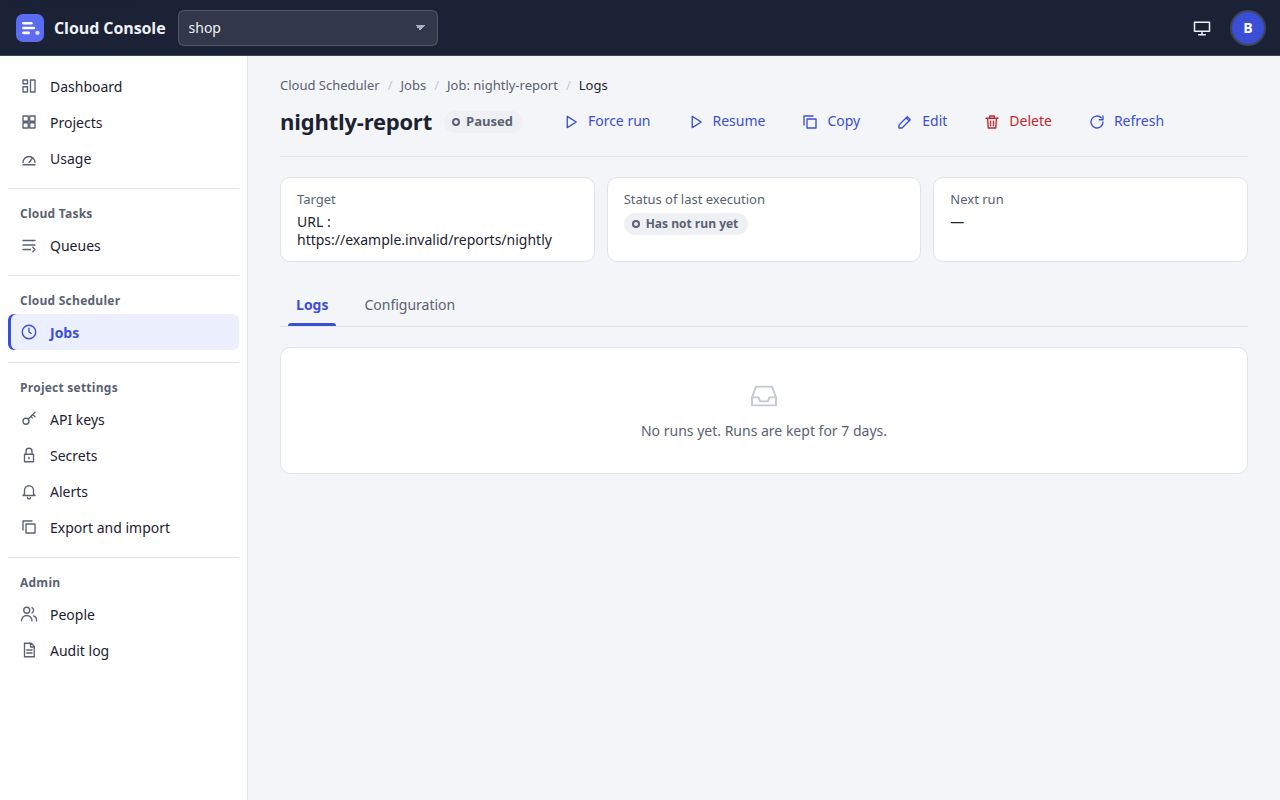
UI breakdown
| Pin | Element | What it does | Rule | Shows or is disabled when | API route |
|---|---|---|---|---|---|
| 1 | State chip | Enabled or Paused. | A paused job has no next run. | Always. | GET /api/projects/{p}/jobs/{j} (stateLabel) |
| 2 | Force run | Runs the job now, besides its schedule. | Counts against the daily quota: over it, 429. While maintenance is on, a forced run waits until it is off. | forceRun: the run permission. | POST …/jobs/{j}/run |
| 3 | Resume | Turns the schedule back on. It reads Pause while enabled. | The notice: Resumed nightly-report. | pause or resume, by state: the pause permission. | POST …/jobs/{j}/resume (or /pause) |
| 4 | Copy | Opens the create form with this job's settings and an empty name. | No route of its own. | copy: the create permission. | Goes to /job-edit?project=shop©=nightly-report |
| 5 | Edit | Opens the job's three steps with its settings. | The name cannot change. | edit: the update permission. | Goes to /job-edit?project=shop&job=nightly-report |
| 6 | Delete | Deletes the job after a confirm, then goes back to Jobs. | The job and its run history are deleted. It cannot be undone. | delete: the delete permission. | DELETE /api/projects/{p}/jobs/{j} |
| 7 | Refresh | Reads the job again. | Disabled and busy while it runs. | Always. | GET …/jobs/{j} |
| 8 | Target | Where the job goes. | URL : <url>, Queue : <name>or Check : <url>. | Always. | targetLabel |
| 9 | Status of last execution | How the last run ended. | Success, Failed (503), Failed, Skipped (daily quota) or Has not run yet. | Always. | lastRunLabel |
| 10 | Next run | When the job runs next. | A dash while paused. A job runs within a minute of its time. | Always. | nextRunAt |
| 11 | Logs tab | The runs, 50 a page, each with Show attempts. | A skipped run says why: still running, daily quota, maintenance or quiet hours. Runs are kept 7 days. | Always; Results shows beside it for a check. | GET …/jobs/{j}/runs, …/runs/{run}/attempts |
| 12 | Configuration tab | The schedule, the execution, a check's expectations and the optional settings, as the API answered them. | Read only; edit with Edit. | Always. | GET …/jobs/{j} |
User stories and acceptance criteria
Resume a paused job
Given nightly-report is paused, so Next run reads a dash
When I click Resume
Then the notice reads
Resumed nightly-report.
and Next run shows its next time.Force run past the quota
Given the project's daily quota is used up
When I click Force run
Then the API answers 429 with code
quotaand the notice shows its message; scheduled runs are skipped and logged asSkipped (daily quota)
.A run while one is going
Given a job set to skip while a run is still going, with a run under way
When its next scheduled time comes
Then no run starts, and Logs shows a run
Skipped (still running)
.
12. API keys
/keys?project=shop
The project's API keys, for apps on /v1. A new key is shown once; after that only its name.
On a narrow screen the picture scrolls sideways. A pin opens its row in the table.
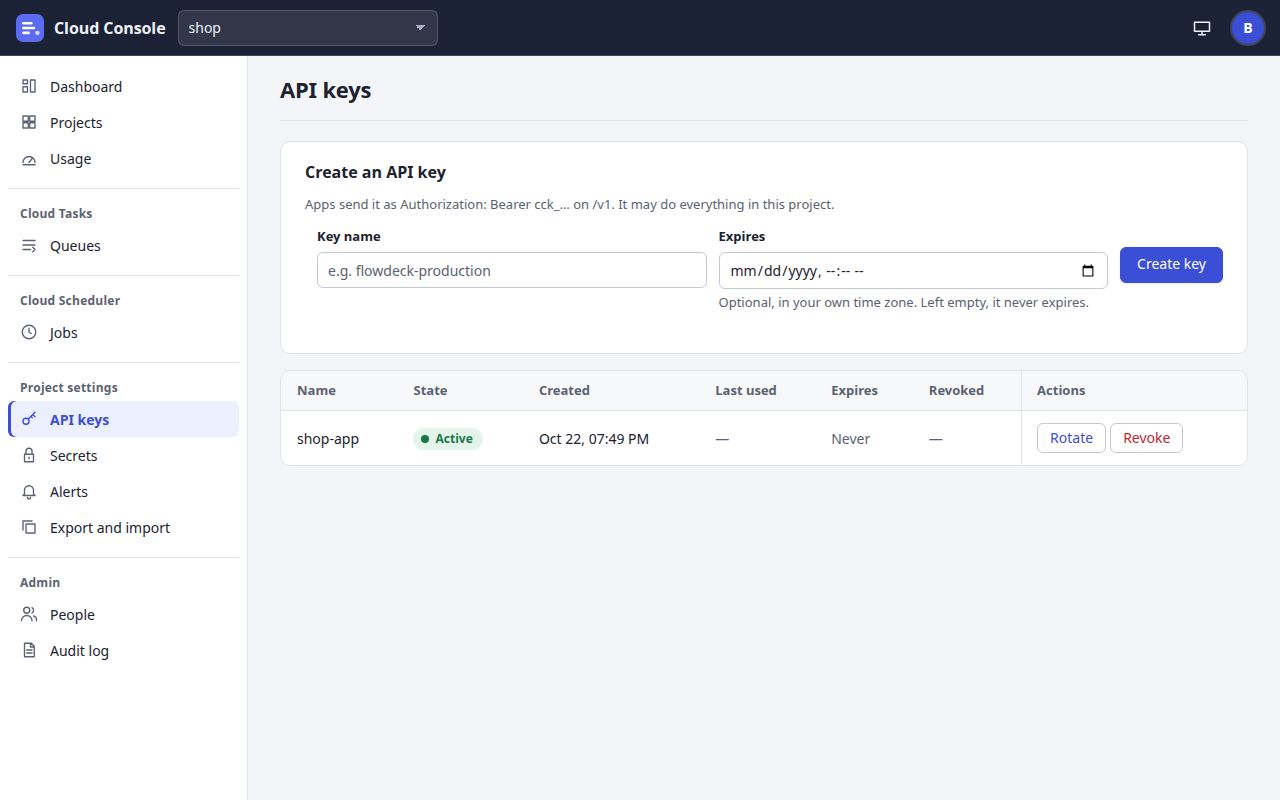
UI breakdown
| Pin | Element | What it does | Rule | Shows or is disabled when | API route |
|---|---|---|---|---|---|
| 1 | API keys | The page itself. | Without the keys permission it says Managing API keys needs the keys permission in this project. Ask an admin. | The keys permission. | GET /api/projects/{p}/keys |
| 2 | Key name | A name for the app that uses the key. | Required. A replacement key may keep the old one's name. | Always. | name |
| 3 | Expires | When the key stops working, in your own time zone. | Optional; empty never expires. More than 1 hour and at most 3 years ahead: expiresAt is more than an hour and at most 3 years ahead. | Always. | expiresAt |
| 4 | Create key | Makes the key and shows it once, with I have copied it. | The console keeps only a hash. A project has at most 20 keys that are not revoked. The admins get a security alert. | The keys permission. | POST /api/projects/{p}/keys |
| 5 | State | Active, Expired or Revoked. | An expired key is refused on /v1 with 401 This API key has expired. | Always. | status |
| 6 | Expires | The key's end, or Never. | Warnings go to the project's alert channels 7 days and 1 day before. | Always. | expiresAt |
| 7 | Rotate | Fills the form with the key's name and an Old key ends field. | The new key is made at once. The old one ends at Old key ends, or 7 days from now (sooner if its own end is sooner). | rotate: while the key is not revoked. | POST …/keys with rotates and oldKeyExpiresAt |
| 8 | Revoke | Revokes the key after Revoke shop-app?. | Apps using it are refused from then on. It cannot be undone. A revoke never counts against the 120 changes an hour. | revoke: while the key is not revoked. | DELETE /api/projects/{p}/keys/{id} |
User stories and acceptance criteria
The key is shown once
Given I fill in Key name
When I click Create key
Then the key is shown once with
Copy it now … You won't see it again: the console keeps only a hash of it.
, and afterI have copied it
only its name shows.Rotate with the default end
Given the key shop-app, and Old key ends left empty
When I click Rotate, then Create key
Then a new key is made and shown once, and shop-app keeps working for 7 days.
The cap on keys
Given the project has 20 keys that are not revoked
When I click Create key
Then nothing is made: 409
A project has at most 20 API keys that are not revoked; revoke one first
.
13. Secrets and service accounts
/secrets?project=shop
The project's secrets and service accounts. Anyone who may read the project sees their names; values are sealed when saved and never shown again.
On a narrow screen the picture scrolls sideways. A pin opens its row in the table.
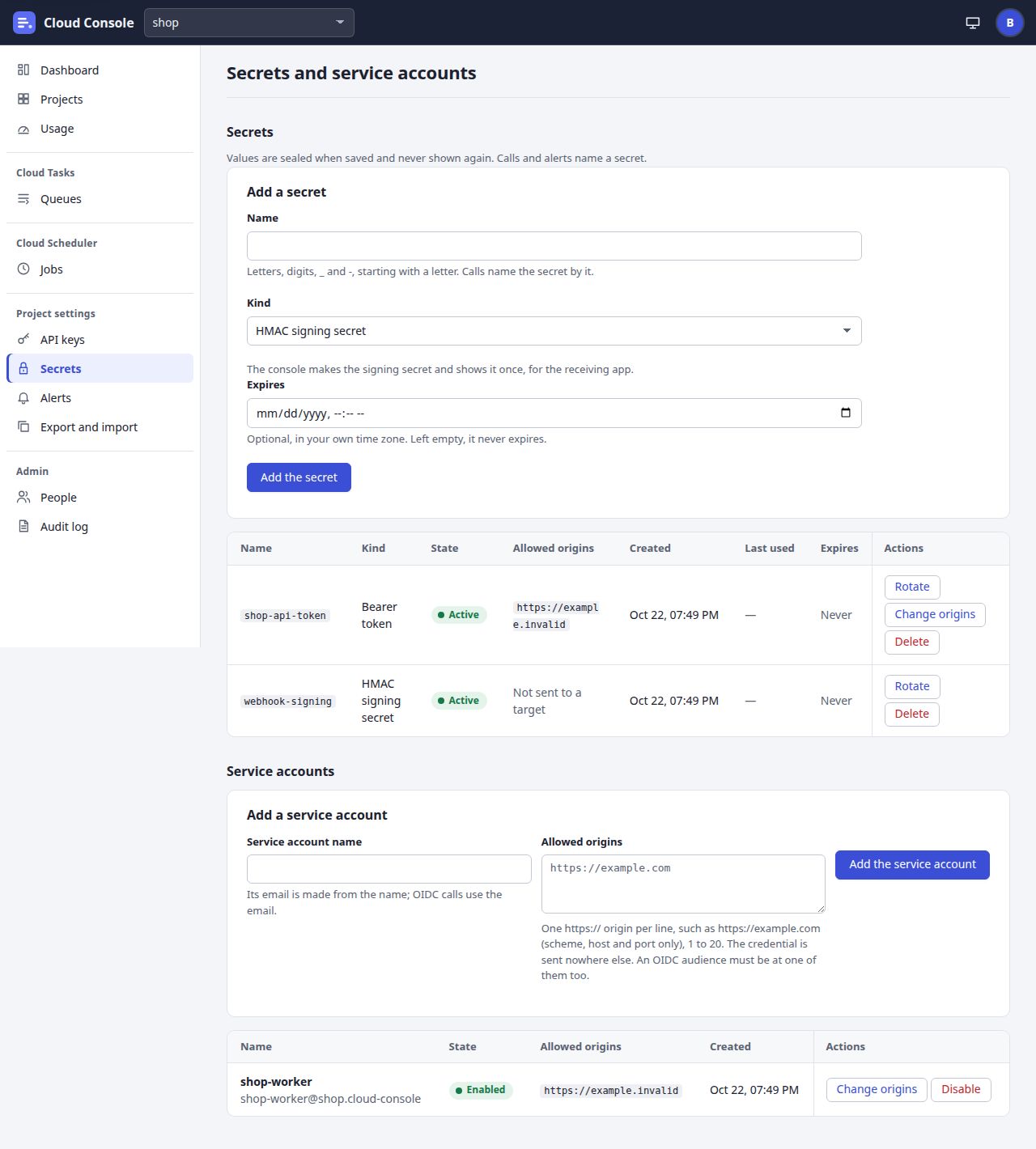
UI breakdown
| Pin | Element | What it does | Rule | Shows or is disabled when | API route |
|---|---|---|---|---|---|
| 1 | Name | The secret's name, which calls and alerts use. | Letters, digits, _ and -, starting with a letter; unique in the project. | With the secrets permission; otherwise Adding or changing these needs the secrets permission in this project. | name |
| 2 | Kind | HMAC signing secret, Basic auth, Bearer token, OAuth client or Google Chat webhook. | The kind decides the fields: a username and password, a token, a token URL and client, or a webhook URL. HMAC has none: the console makes it. | With the secrets permission. | kind |
| 3 | Expires | When the secret stops working. | Optional; more than 1 hour and at most 3 years ahead. Past it, a call that names it fails as auth. | With the secrets permission. | expiresAt |
| 4 | Add the secret | Saves the secret. An HMAC secret's signing secret is shown once. | Typed values never stay in the page, saved or refused. A project has at most 200 secrets. | With the secrets permission. | POST /api/projects/{p}/secrets |
| 5 | Allowed origins | Where a credential may be sent. | 1 to 20 https:// origins for Basic, Bearer and OAuth secrets. A task or job whose URL is elsewhere is refused at url. HMAC and chat secrets read Not sent to a target. | Always. | allowedOrigins |
| 6 | Rotate | Fills the form with the secret's kind and the parts that are not secret, an empty name and value. | The new secret gets a new name; the old one keeps working until its own end or its delete. Move the jobs, tasks and alerts that name it. | With the secrets permission. | POST …/secrets with rotates |
| 7 | Delete | Deletes the secret after a confirm. | Calls that name it fail as auth from then on. 409 A job or the alert settings use this secret. | With the secrets permission. | DELETE /api/projects/{p}/secrets/{name} |
| 8 | Service account name | The account OIDC calls are signed as. | Its email is made from the name: <name>@<project>.cloud-console. A project has at most 100 accounts. | With the secrets permission. | name |
| 9 | Allowed origins | Where the account's tokens may go. | One https:// origin per line, 1 to 20. An OIDC audience must be at one of them, and at the URL's own origin. | With the secrets permission. | allowedOrigins |
| 10 | Add the service account | Makes the account. | The notice names its email. | With the secrets permission. | POST /api/projects/{p}/service-accounts |
| 11 | Change origins | Opens an editor for the account's allowed origins. | The same rules; the API's message shows beside the field. | With the secrets permission. | PATCH …/service-accounts/{name} { allowedOrigins } |
| 12 | Disable | Disables the account; Enable turns it back on. | An OIDC call as a disabled account fails its attempt as auth. | With the secrets permission. | PATCH …/service-accounts/{name} { disabled } |
User stories and acceptance criteria
An HMAC secret is made by the console
Given Kind HMAC signing secret
When I click Add the secret
Then the console makes the signing secret and shows it once, for the receiving app, with
I have copied it
.A secret still in use
Given a job calls with the secret shop-api-token
When I delete it
Then it stays: 409
A job or the alert settings use this secret
.A credential at the wrong origin
Given shop-api-token may go only to its one origin
When a task names it with a URL at another origin
Then the task is refused (400) with the message at
url, and nothing is sent.
14. Alerts
/alerts?project=shop
The project's alert settings, a test, and its quiet hours. The page needs the update permission.
On a narrow screen the picture scrolls sideways. A pin opens its row in the table.
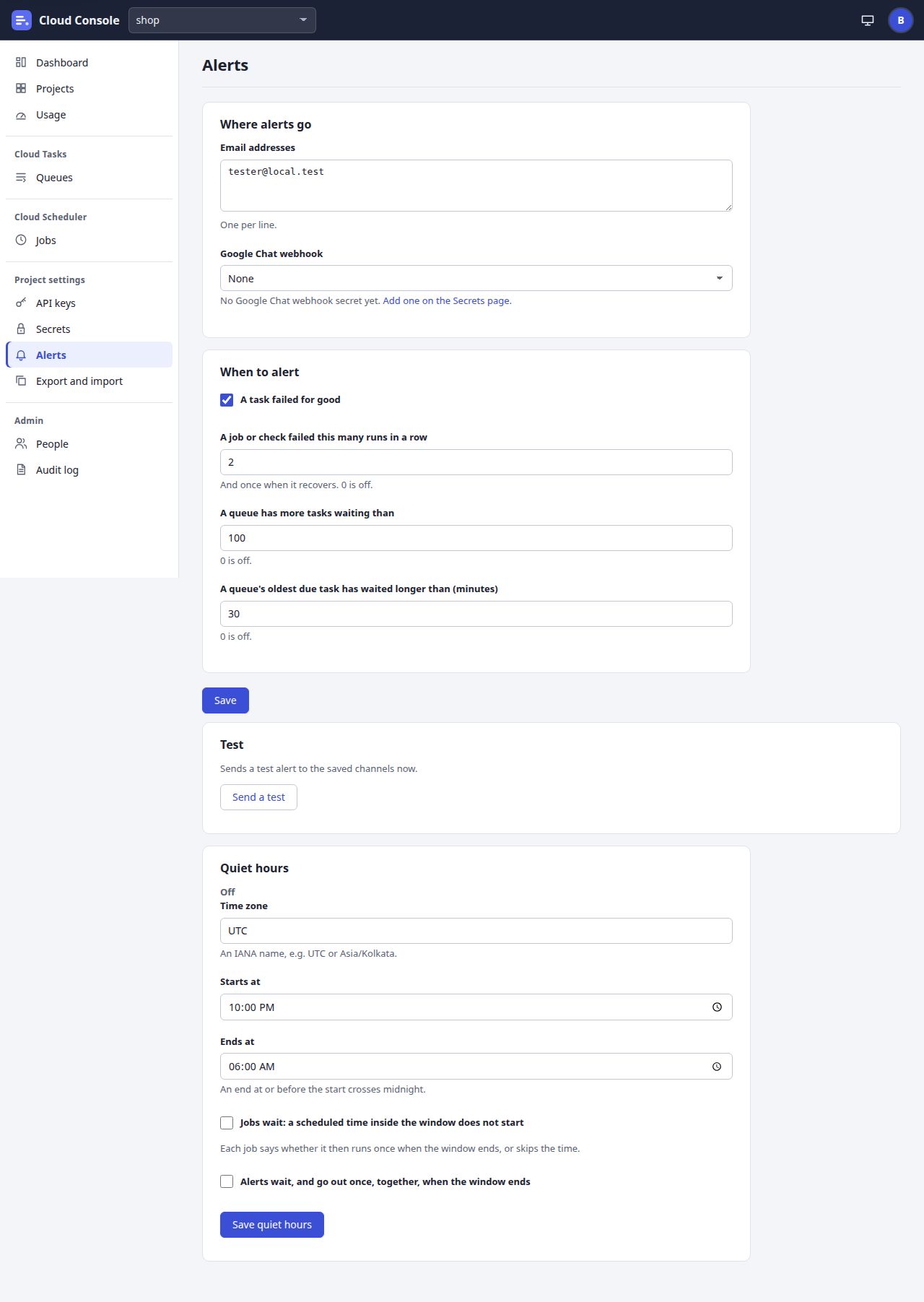
UI breakdown
| Pin | Element | What it does | Rule | Shows or is disabled when | API route |
|---|---|---|---|---|---|
| 1 | Email addresses | Where alert mail goes, one per line. | At most 10. A member may add only an active console user who may read the project: x is not an active console user who may read shop; only an admin may add other addresses. | The update permission; otherwise Alert settings need the update permission in this project. Ask an admin. | emailTo |
| 2 | Google Chat webhook | A secret of the Google Chat webhook kind, or None. | Only such a secret is taken. With none yet, a link says Add one on the Secrets page. | The update permission. | chatSecret; the list from GET …/secrets |
| 3 | A task failed for good | Alerts when a task runs out of attempts. | On by default. | The update permission. | taskFailed |
| 4 | A job or check failed this many runs in a row | Alerts after that many failures, and once when it recovers. | 0 to 10; 0 is off. Default 2. | The update permission. | jobFailuresInARow |
| 5 | A queue has more tasks waiting than | Alerts on a backlog. | 0 to 1,000,000; 0 is off, the default. | The update permission. | backlogTasks |
| 6 | A queue's oldest due task has waited longer than (minutes) | Alerts on a stale queue. | 0 to 10,080; 0 is off, the default. At most one alert of a kind about one queue or job every 10 minutes. | The update permission. | backlogMinutes |
| 7 | Save | Saves the settings: Saved the alert settings. | Every queue sees the change within a minute. | The update permission. | PUT /api/projects/{p}/alerts |
| 8 | Send a test | Sends a test alert to the saved channels now, and lists each channel as Sent or Not sent. | At most 10 an hour per project. With no channel: 409 No alert channel is set. | The update permission. | POST /api/projects/{p}/alerts/test |
| 9 | Time zone | The quiet hours' zone. | An IANA name. Default UTC. | The update permission. | timeZone |
| 10 | Starts at | When the daily window starts. | HH:MM. Default 22:00. | The update permission. | start |
| 11 | Ends at | When the window ends. | Not the same as the start; an end at or before the start crosses midnight. Default 06:00. | The update permission. | end |
| 12 | Jobs wait, Alerts wait | Two switches: jobs do not start in the window; alerts wait and go out once, together, when it ends. | Both off is off, the default. Each job says whether it then runs once at the end or skips the time. | The update permission. | holdJobs, holdAlerts |
| 13 | Save quiet hours | Saves the window and shows its label, such as 22:00 to 06:00 (UTC): jobs wait, alerts wait. | While a window is on, the page says until when. | The update permission. | PUT /api/projects/{p}/quiet-hours |
User stories and acceptance criteria
An address that is not a user
Given a member adds an address that is no console user's
When they click Save
Then nothing is saved and Email addresses shows that it is not an active console user who may read shop.
A test with nowhere to go
Given no email address and no Google Chat webhook
When I click Send a test
Then the API answers 409
No alert channel is set
.Alerts wait for the morning
Given quiet hours 22:00 to 06:00 with Alerts wait
When a task fails for good at 23:00
Then nothing is sent then; when the window ends at 06:00 one message goes, starting
Quiet hours ended for shop:
with how many alerts waited.
15. Export and import
/settings-file?project=shop
A project's settings as one JSON file, to keep or to copy to another project. Never a secret's value, a key or a token.
On a narrow screen the picture scrolls sideways. A pin opens its row in the table.
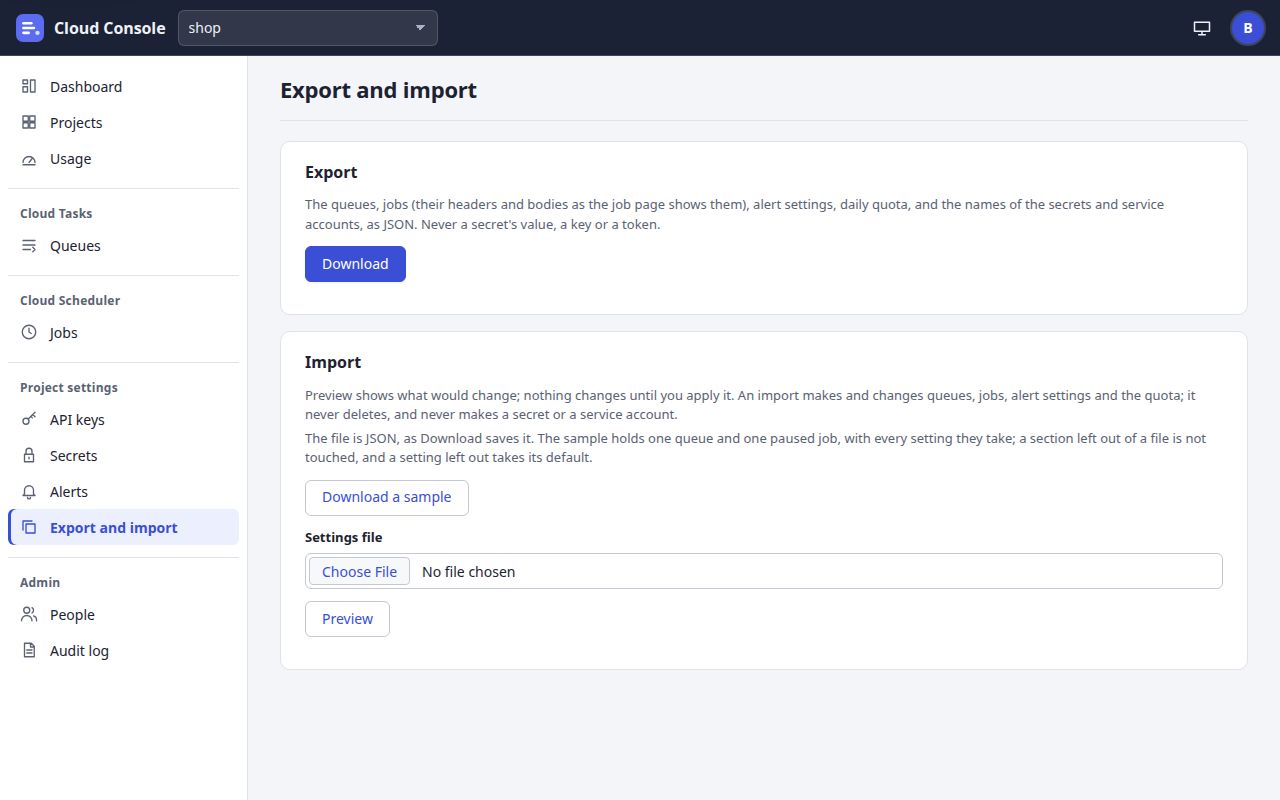
UI breakdown
| Pin | Element | What it does | Rule | Shows or is disabled when | API route |
|---|---|---|---|---|---|
| 1 | Export and import | The page, under Project settings. | At most 20 exports and imports an hour per person, dry runs included. | Anyone who may read the project. | None |
| 2 | Export | The queues, jobs, alert settings, daily quota, and the names of the secrets and service accounts. | A person without update gets no alert settings in it. | Read. | None |
| 3 | Download | Saves the export as shop-settings.json. | Audited as an export. | Read. | GET /api/projects/{p}/settings-file |
| 4 | Import | Preview, then Apply, a settings file. | An import makes and changes queues, jobs, alert settings and the quota; it never deletes, and never makes a secret or a service account. | The update permission; otherwise Importing needs the update permission in this project. | None |
| 5 | Download a sample | Saves cloud-console-settings-sample.json. | The page's own text, no request: one running queue and one paused job, so importing it unchanged calls nothing. | The update permission. | None |
| 6 | Preview | Posts the file chosen in Settings file as a dry run and shows what would change. | Nothing changes. It shows the label, the changes, the skipped items with why, and the names the project lacks. A file that is not JSON is said so without a request; no file: Choose a settings file first. | The update permission. | POST …/settings-file { settings } |
| Under pin 6 | Apply (under the preview) | Posts the same file again with apply: true and shows the result. | Worked out again from the project as it is then, and written in one batch; a failure changes nothing. At most 40 queues and jobs made or changed in one import. | Only when the dry run's allowedActions has apply: create to make, pause to pause, admin for the quota. | POST …/settings-file { settings, apply: true } |
User stories and acceptance criteria
Preview the sample
Given the sample file, unchanged, and the update, create and pause permissions
When I click Preview
Then the label says what would be made, nothing changes, and Apply shows below it.
Apply without the create permission
Given a file that makes a queue, and no create permission
When I click Preview
Then there is no Apply, and the label says why; an apply sent anyway is 403
Applying this needs the create permission
.A mistake deep in the file
Given a file whose third queue has Max attempts 0
When I click Preview
Then nothing changes and the message names
settings.queues.2.maxAttempts.Too many files
Given 20 exports and imports this hour
When I click Download
Then the API answers 429
At most 20 exports and imports an hour; try again later
.
16. Usage
/usage
Today's free-plan usage as the Worker counts it, each project's count against its daily cap, and, for admins, the backups.
On a narrow screen the picture scrolls sideways. A pin opens its row in the table.
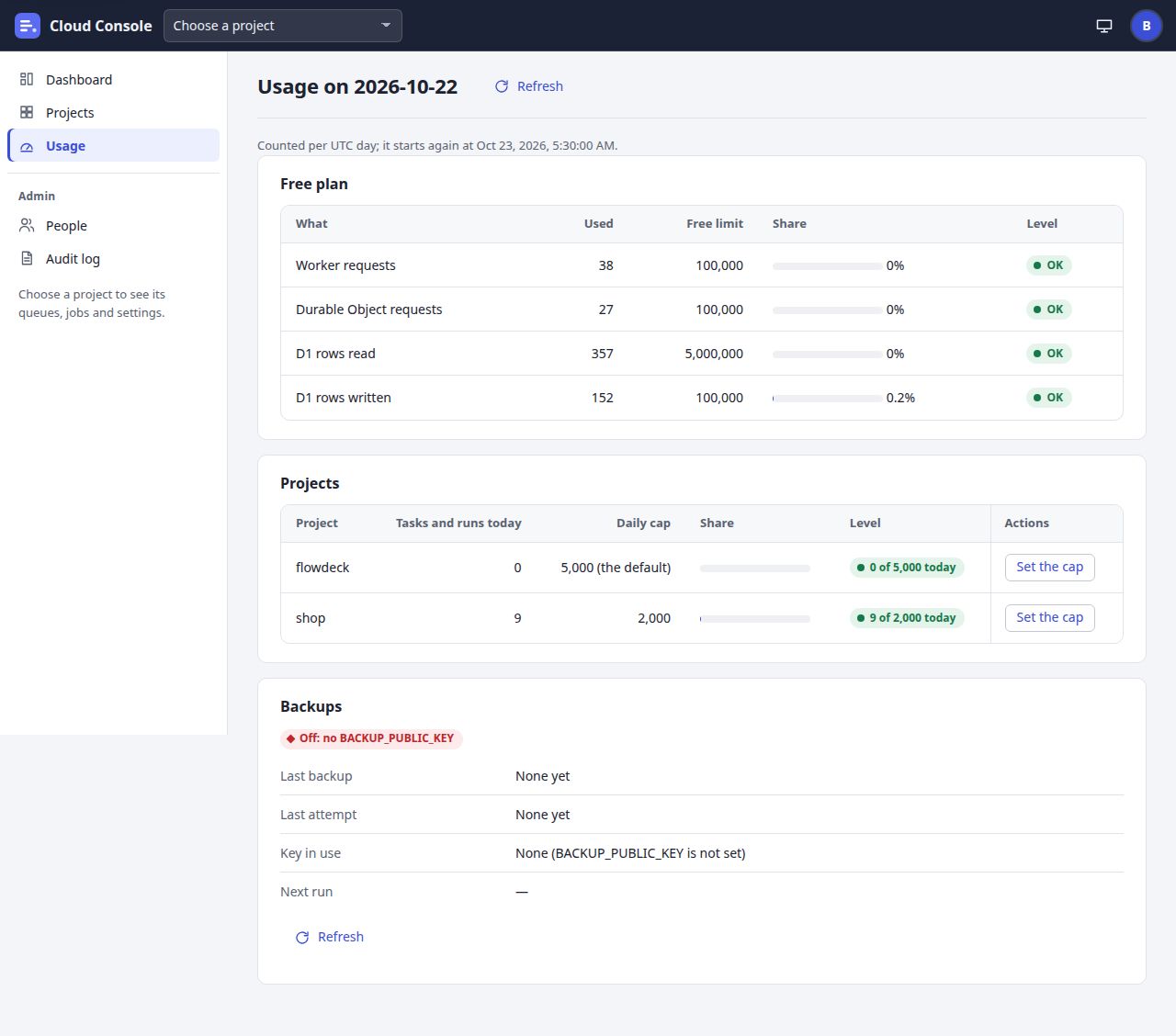
UI breakdown
| Pin | Element | What it does | Rule | Shows or is disabled when | API route |
|---|---|---|---|---|---|
| 1 | Refresh | Reads the usage again. | Counted per UTC day; the hint under the title says when it starts again. | Always. | GET /api/usage |
| 2 | Free plan | Worker requests and Durable Object requests (100,000 each), D1 rows read (5,000,000) and D1 rows written (100,000). | From 80% a line is near: low queues are held and the admins alerted. At 100% every queue is held and new tasks and job runs are refused until 00:00 UTC. | Every signed-in person. | lines |
| 3 | Level | OK, Near the limit or Over the limit. | The API's level; the colour and shape follow it. | Always. | level, levelLabel |
| 4 | Projects | Each project's task creations and job runs today against its cap. | Retries after a task's first attempt count too. Only the projects you may read. | Always. | projects |
| 5 | Daily cap | The cap in force. | 5,000 (the default)until an admin sets one; Nonewhen turned off. | Always. | capLabel |
| 6 | Level | The count against the cap, such as 9 of 2,000 today. | Over the cap, a create is 429 quota and a scheduled run is skipped and logged. | Always. | label, level |
| 7 | Set the cap | Opens a Daily cap field for the project. | 1 to 1,000,000; 0 for no cap; empty for the default (5,000). | setQuota: admins only. | PUT /api/projects/{p}/quota { dailyCap } |
| 8 | Backups state | The daily sealed backup's state. | Up to date, A backup is running, No backup yet, Stale after 26 hours, The last attempt failed, or Off with why. Back up now shows when backups are on and none runs; at most 3 an hour. | The section with manageBackups: admins only. | GET /api/backups, POST /api/backups/run |
| 9 | Refresh the backups | Reads the backups again. | Loaded apart from the usage, so the usage shows whatever the backups answer. | Admins only. | GET /api/backups |
User stories and acceptance criteria
Back to the default cap
Given shop's cap is 2,000 and I am an admin
When I click Set the cap, empty the field and click Set the cap
Then the notice names shop and its count, and its Daily cap reads
5,000 (the default)
.A member sees the totals only
Given a member
When they open Usage
Then they see the Free plan lines and their projects, but no Set the cap and no Backups section.
A free limit is used up
Given D1 rows written passed 100,000 today
When anyone opens Usage
Then the line reads Over the limit and a red line says every queue is held, and new tasks and job runs are refused, until the next UTC day.
17. People
/users
The console's people and its open invitations, for admins. People come in only by invitation.
On a narrow screen the picture scrolls sideways. A pin opens its row in the table.
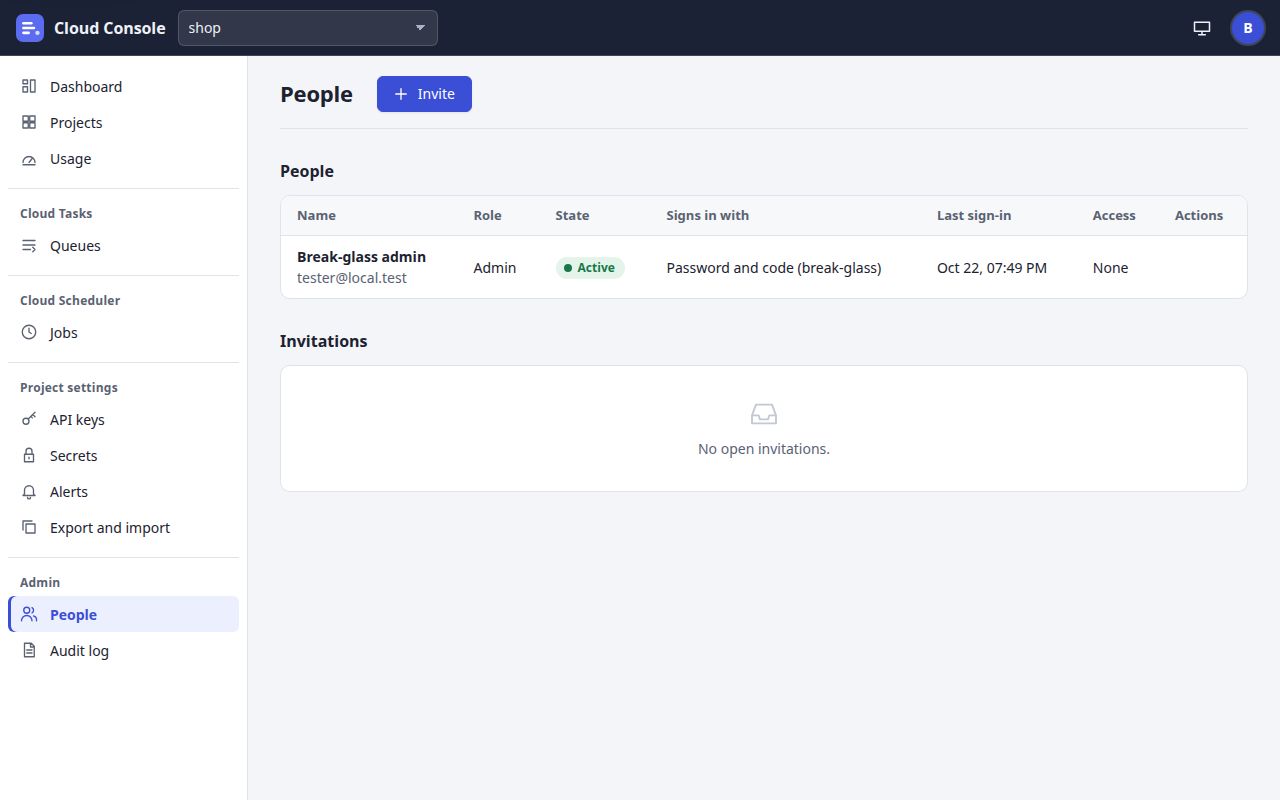
UI breakdown
| Pin | Element | What it does | Rule | Shows or is disabled when | API route |
|---|---|---|---|---|---|
| 1 | Invite | Opens Invite someone: Email, Role, and Permissions per project. | The grid has a row per project and one for every project, those made later too; a preset (viewer, editor, manager) only ticks boxes. Mail must be on. | invite: admins only. | POST /api/invitations |
| 2 | People | Everyone with an account. | A non-admin sees Managing people is for admins. | manageUsers: admins only. | GET /api/users |
| 3 | Name and email | The person's name, and their email under it. | The break-glass admin is the one local account. | Always. | name, email |
| 4 | Role | Admin or Member. | An admin may do everything; a member only what their grants give. | Always. | role |
| 5 | State | Active or Disabled. | A disabled person's address is left out of alert mail. | Always. | disabled |
| 6 | Signs in with | Password and code (break-glass), Google, or Not signed in yet. | Display only. | Always. | breakGlass, linked |
| 7 | Access | The person's grants per project, such as flowdeck: read, run, or None. | Edited with Edit access, a grid of boxes. | Always. | projects |
| 8 | Actions | Edit access, Make admin or Make member, Disable or Enable, and Remove. | For yourself, only Edit access. For the break-glass admin, none, so this row has no menu. The API refuses the others too (409). | From the person's allowedActions. | PUT /api/users/{id}/access, PATCH and DELETE /api/users/{id} |
| 9 | Invitations | The open invitations, with Resend and Cancel. | An expired one shows an Expired chip and may still be resent. Cancel stops its link working. | invite: admins only. | GET /api/invitations, POST …/{id}/resend, DELETE …/{id} |
User stories and acceptance criteria
No actions on the break-glass admin
Given the break-glass admin's row
When I look for its menu
Then there is none, and a change sent anyway is refused with 409.
Mail is off
Given a valid email and mail settings not set
When I click Send the invitation
Then the API answers 503
Mail is off: set the MAIL_* settings to send invitations
, after checking the fields first.Someone already here
Given an address that already has an account
When I invite it
Then it is refused: 409
That person is here already
.A preset only ticks boxes
Given the editor preset chosen for shop
When I look at shop's row
Then read, create, update, pause and run are ticked, and what is sent is the ticked boxes.
Status and labels
Every state the console shows as a chip. The words are the API's label; the colour and the shape follow the state it answered, so a state never rests on colour alone.
| Where | Chip | Colour and shape | Meaning |
|---|---|---|---|
| Task | Queued Retrying (attempt 3) Running | Blue, a ring with a gap | Waiting for its time, a free slot or a retry; or an attempt under way. Retrying names the next attempt. |
| Task | Succeeded | Green, a filled dot | A 2xx answer came. The name is remembered 24 hours. |
| Task | Failed | Red, a diamond | Failed for good: attempts or retry duration used up, or a status not retried. Kept 7 days on the Failed tab. |
| Task | Deleted | Grey, an open ring | Deleted by a person or an app. The name is remembered 24 hours. |
| Queue | Running Held until 00:00 UTC (daily limit) | Green, a filled dot | Sends its due tasks. A low-priority queue near a free limit is held until the next UTC day; its state is still running, so the chip stays green. |
| Queue | Paused | Grey, an open ring | Takes tasks but sends none until resumed. |
| Job | Enabled | Green, a filled dot | Runs on its schedule. |
| Job | Paused | Grey, an open ring | No next run until resumed. |
| Job run, last execution | Success | Green, a filled dot | The run ended with a 2xx answer. |
| Job run, last execution | Failed (503) | Red, a diamond | The run failed after its retries; the code or error kind in brackets when there is one. |
| Job run, last execution | Skipped (still running) Skipped (daily quota) Skipped (maintenance) Skipped (quiet hours) | Amber, a triangle | A scheduled time that did not run, and why. Logged as a run. |
| Job run, last execution | Running | Blue, a ring with a gap | A run under way, its retries included. |
| Job run, last execution | Has not run yet | Grey, an open ring | No run yet. |
| Uptime check | Up Down (slow) | Green dot; red diamond | A check passed, or failed and why. |
| Dashboard and Usage, free plan | OK Near the limit Over the limit | Green dot; amber triangle; red diamond | Under 80%; from 80% (low queues held, admins alerted); at 100% (every queue held until 00:00 UTC). |
| Usage, a project | 9 of 2,000 today | By the same level | The count against the project's daily cap. |
| Dashboard, cron | Running Parts failing Not run yet Stale | Green dot; amber triangle; red diamond | The every-minute cron ran; ran with a part failing; never noted; or not noted for 10 minutes. |
| Usage, backups | Up to date A backup is running No backup yet Off: … | Green; blue; amber; red | The daily backup's state. Stale (over 26 hours) and a failed last attempt are red too. |
| API keys, secrets | Active Expired Revoked | Green dot; grey ring | In use; past its end date; revoked (keys only). |
| Service accounts, people | Enabled Active Disabled | Green dot; grey ring | May be used, or may sign in; or disabled. |
| Invitations | Expired | Amber, a triangle | The link has expired; Resend sends a new one. |
| Alerts, test | Sent Not sent | Green dot; red diamond | Each channel's result, with its error when not sent. |
Cloud Console as it is on main, 22 Oct 2026. The screenshots come from a local copy with the made-up demo project shop. More in Project info.