Cloud Console Own Projects

The console says why it refused, in one sentence. Find the message below: what it means and what to do. Where a message holds a name or a number, it shows here as ….

Quotas and limits

MessageWhat it meansHow to fix it
The project's daily quota of … tasks and job runs is used upThe project made its daily cap of task creations, job runs and task retries today (UTC). Nothing was added; scheduled runs are skipped (Skipped (daily quota)).Wait for the next UTC day (Usage says when), or ask an admin to raise the cap.
The project's daily quota of … tasks and job runs has room for … more today; the file has … tasksA file of tasks counts as one: the day has room for some of its tasks but not all, so none was made.Make a smaller file, or wait for the next UTC day.
The daily quota of … is used upA Force run over the project's daily cap.As above: wait, or ask an admin to raise the cap.
The console is over a free-plan limit today; new tasks are refused until … UTCThe whole console used up one of its free limits today. Every queue is held; new tasks and job runs are refused. The Dashboard and Usage say A free-plan limit is used up: every queue is held, and new tasks and job runs are refused, until …Wait for the time it says (00:00 UTC). Nobody can lift it early. Sign-in and the pages go on.
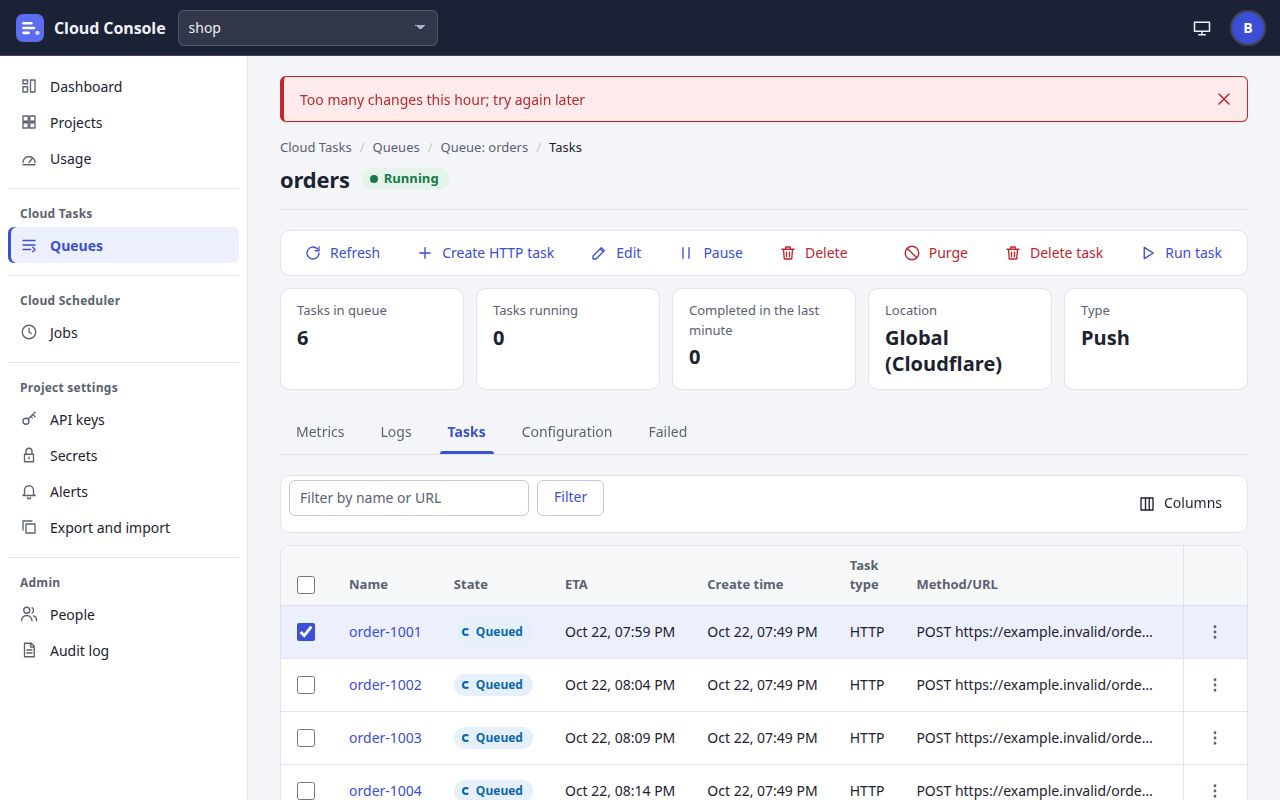
Too many changes this hour; try again laterYou made 120 changes in the last hour. A file of tasks counts one change per 10 tasks.Wait, then try again.
Too many queue and job reads this hour; try again laterYour hourly budget of reads of queues and jobs is spent: each page and list counts the rows it reads.Wait, then try again. Refresh less often.
At most 10 filtered or sorted task lists an hour; try again laterA filtered or sorted task list costs more, so each person has 10 an hour. A queue also has limits of its own (This queue has had … task lists this hour; try again later).Use the list without a filter or sort, or wait.
At most 20 exports and imports an hour; try again laterEach person may download or preview or apply a settings file 20 times an hour, together.Wait, then try again.
At most 10 test alerts an hour for a project; try again laterThe project sent 10 test alerts this hour.Wait. Real alerts are not affected.
A project has at most 200 jobs, A project has at most 20 API keys that are not revoked; revoke one firstThe project is at one of its limits: 100 queues, 200 jobs, 200 secrets, 100 service accounts, 20 keys not revoked.Delete or revoke one you no longer need.
The queue page with a red notice at the top: Too many changes this hour; try again later
A refusal on a page action shows as a red notice at the top.

Tasks, jobs and their calls

MessageWhat it meansHow to fix it
A task named … is in this queue, or succeeded or was deleted within the last dayTask names are unique in a queue. The queue remembers a name while the task waits, runs or is failed (7 days), and for a day after it succeeded or was deleted.Use another name, or leave Task name empty so the queue names it. On the form, this shows at the top: scroll up to read it.
The URL is a private, local or reserved address, The URL names a local or internal host, The URL cannot be the console itselfTasks and jobs call only public addresses: never localhost, .local or .internal names, private ranges, or the console. A host is checked again before each attempt; an attempt refused then shows Blocked URL.Use the public address of the target.
The URL must start with http:// or https://, The URL cannot hold a user name or password; use an auth optionThe URL is not one the console can call as it is.Type a full http:// or https:// address; put credentials in a secret and choose it under Auth.
No … secret named … in this projectThe task or job names a secret this project does not have, or one of another kind (a Bearer token for Basic auth, say).Add the secret on Secrets, or choose one of the right kind.
The secret … has expiredThe secret passed its end date. At run time an attempt fails as Auth failed: The secret … expired at … UTC.Rotate it, and move the tasks and jobs to the new name.
The secret … may not be sent to this URL's origin (its allowedOrigins, on the Secrets page)The URL is not at one of the secret's allowed origins, so the credential is not sent there.Fix the URL, or add its origin with Change origins on Secrets (the secrets permission).
No service account … in this project, The service account … is disabledThe OIDC option names an account that does not exist, or is disabled.Add it, or Enable it, on Secrets.
A token of … may not be sent to this URL's origin (its allowedOrigins, on the Secrets page), The audience is not at one of …'s allowed origins, The audience must be at the URL's own originThe service account's tokens may go only to its allowed origins, and the audience must be at the URL's own origin.Fix the URL or the audience, or the account's origins.
No such queue, No such job, No such taskIt is not in this project: it was deleted, the link is old, or the name is mistyped.Open it again from its list, and check the project in the picker.
No such project, and the page No such project: That project does not exist, or you have no access to it.The project does not exist, or you have no permission on it.Choose a project from the picker, or ask an admin for access.
The task is running or already doneThe action does not fit the task's state now.Refresh. A running task finishes on its own.

Forms and files

MessageWhat it meansHow to fix it
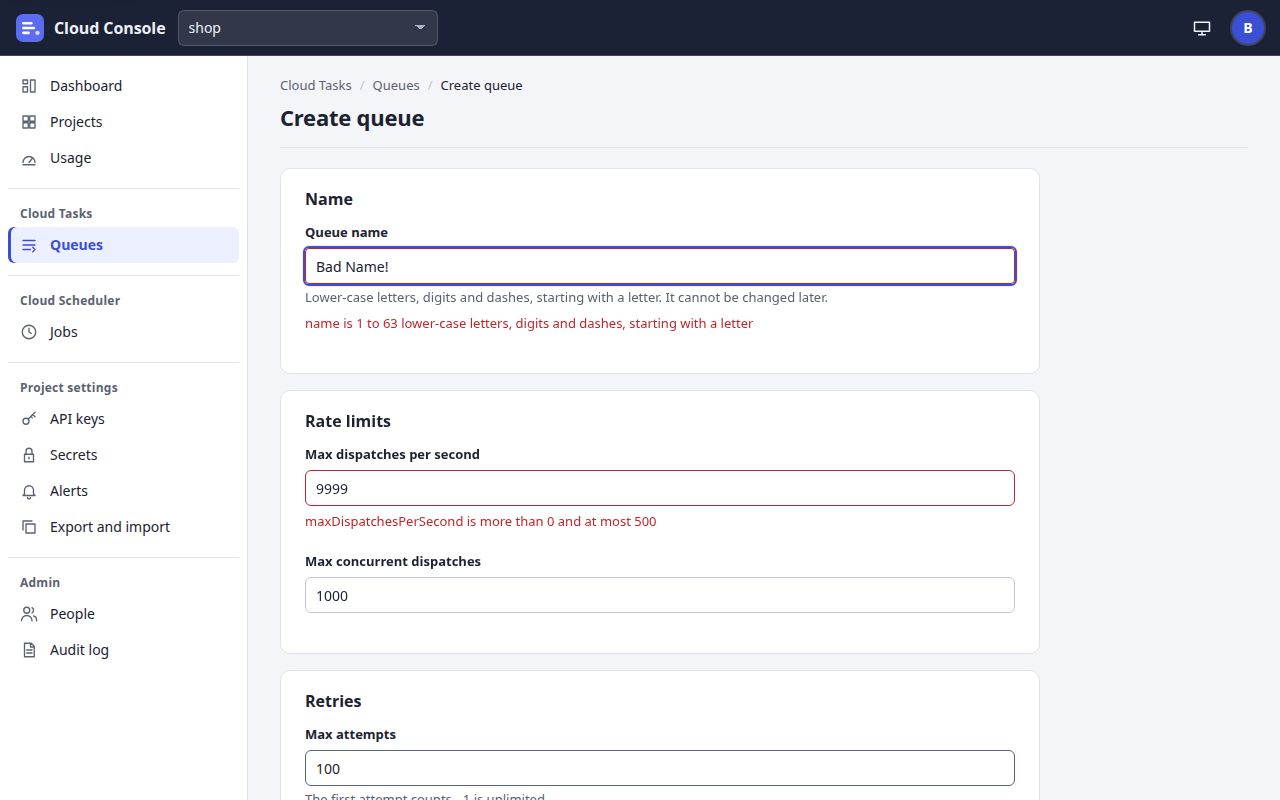
A message beside a field, such as name is 1 to 63 lower-case letters, digits and dashes, starting with a letter, maxDispatchesPerSecond is more than 0 and at most 500 or minBackoff is at most maxBackoffThe console checked the form and refused that field. The message names the field as the console knows it.Change the field and send the form again. On a job, the step that holds the field opens.
Check these: at the top of a formMessages the console could not place beside a field.Read each line; fix and send again.
… is not a JSON file.The file you chose is not valid JSON. Nothing was sent.Fix the file in a text editor, or start again from Download a sample.
Choose a file of tasks first., Choose a settings file first.You clicked Create tasks or Preview with no file chosen.Choose the file, then click again.
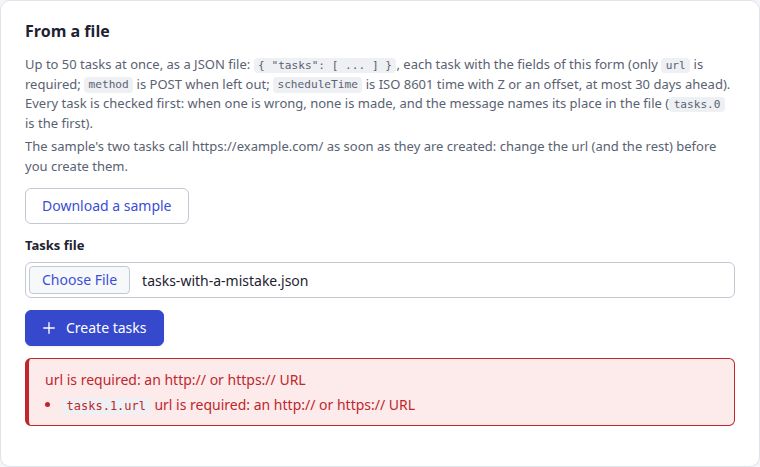
A path before the message, such as tasks.1.url url is required: an http:// or https:// URLA mistake in a file names its place: tasks.0 is the first task, tasks.1 the second, then the field. In a settings file: settings.queues.2.maxAttempts. Nothing was made.Fix that place in the file and try again.
Not a field of this requestA file holds a field the console does not know.Take it out, or compare with the sample.
The Create queue form with red messages under two fields
Field messages beside their fields.
The From a file panel with a red message and the path tasks.1.url
A file's mistake, with its place in the file.

Signing in

MessageWhat it meansHow to fix it
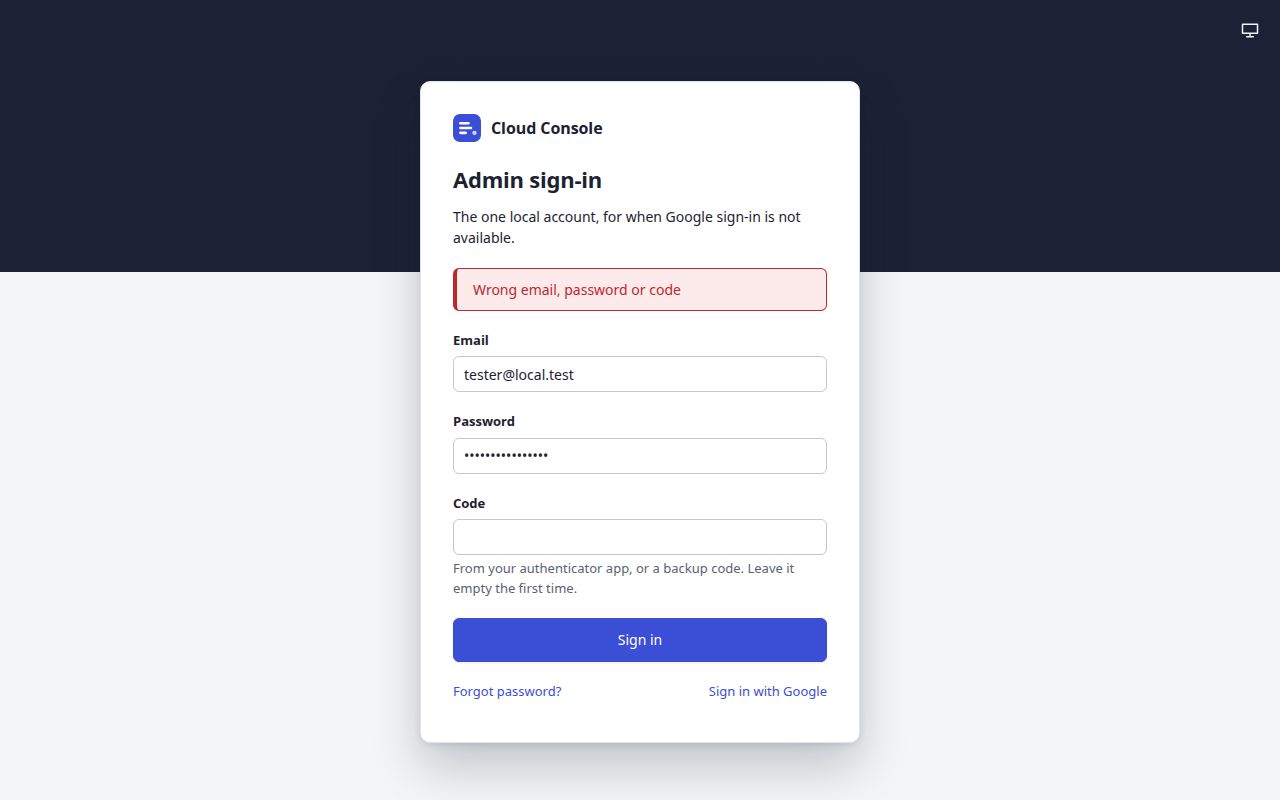
Wrong email, password or codeThe break-glass sign-in was refused. It is the same for every reason: a wrong email, a wrong password, a wrong or used code, and a locked account.Check all three and use a fresh code (or an unused backup code). After 5 wrong tries from your address it is locked for you for 15 minutes; after 50 from all addresses, for everyone. Wait 15 minutes, or reset the password.
Too many sign-in attempts from this address; try again laterToo many sign-in tries from your address in 15 minutes.Wait, then try again.
Wrong code: enter the code your authenticator shows now, The enrolment has expired; sign in againDuring the authenticator set-up: the code was wrong, or the set-up waited too long.Type the code the app shows now; or sign in again to start the set-up again.
Not invited: ask an admin to invite you, This account is disabledThe Google account is not a console user, or an admin disabled it.Ask an admin to invite you (or enable you), then accept from the link.
This invitation has expired or was used; ask an admin to send it againThe invitation link is older than 7 days, or was used.Ask the admin to resend it.
This passkey was not acceptedA passkey sign-in was refused. It is the same for every reason.Try another passkey, or sign in with Google and add a new one.
Sign in with Google (or your password) first: a passkey works for 30 days after oneYour last sign-in with Google or the password was more than 30 days ago.Sign in with Google (or the password) once; passkeys work again.
The passkey sign-in has expired; start again, No passkey was used: it was cancelled, timed out, or this device has none for the console.The passkey prompt was cancelled or waited too long, or this device holds no passkey for the console.Click Sign in with a passkey again, on a device that holds one.
Sign in again to add or remove a passkeyAdding or removing a passkey needs a sign-in in the last 15 minutes.Sign out, sign in, and try again.
Sign in firstYour session ended: 12 hours without use, 7 days at most, or a sign-out on every device.Sign in again.
The Admin sign-in card with the red message Wrong email, password or code above the fields
The break-glass refusal: one message for every reason.

Pages and banners

MessageWhat it meansHow to fix it
The banner Maintenance is on for …: its queues and jobs are held with who switched it on and whenThe project's maintenance switch is on: nothing is sent, new tasks are accepted and wait, scheduled job runs are skipped. Maintenance is on for the whole console: every queue and job is held is the console's switch.If the deploy is over, click Resume dispatch on Projects (the pause permission), or ask who switched it on.
Something went wrong on this page. Reload and try again.The page met an error that was not a message from the console, such as a lost connection.Reload the page. If it goes on, tell an admin: the console may be down.
The page The console could not loadThe console did not answer when the page opened.Click Try again, or Back to sign-in.
Only an admin may do thisThe action is for admins.Ask an admin.
A maintenance switch changes at most once every 10 seconds; try again shortlyThe switch was changed less than 10 seconds ago.Wait a moment, then try again.
No alert channel is setA test alert with no email address and no chat saved.Add a channel on Alerts and click Save, then test.
Mail is off: set the MAIL_* settings to send invitationsThe console's mail is not set up, so it cannot send invitations (or reset links, or summaries).Ask the console's owner to set up its mail.

FAQs

Why is a button missing?

Why did my task not run yet?

Why did my job not run?

How long are things kept?

WhatHow long
A failed task7 days in its queue
A task's name, after it succeeded or was deleted1 day (a new task cannot take it meanwhile)
A task's headers and bodyUntil the task is done
Attempts of a taskIts newest 10, at most 7 days
A job's runs7 days
An uptime check's resultsIts last 100
A queue's metricsPer minute for 2 days, per hour for 30 days
The audit log400 days
An invitation link7 days, and one use
A password reset link30 minutes, and one try
A session12 hours without use, 7 days at most
A daily summary's unsubscribe link60 days
An API key or secretUntil its end date, if it has one, or until it is revoked or deleted

Where do I get help?

Cloud Console user manual, from the console as it is on main. The pictures are of a local copy with a made-up project, shop, and a made-up admin. 22 Oct 2026.